
Oracle Forms file upload using PL/SQL
This guide teaches you how to copy files from a user’s computer to a network share using Oracle Forms. We’ll start with the basic technique using GET_FILE_NAME and HOST, then fix all the common bugs that plague most forum examples. By the end, you’ll have a production-ready trigger that handles spaces in filenames, extracts file extensions correctly, and actually knows when the copy succeeds.
This work for all versions. Oracle Forms developers working with 6i, 10g, 11g, or 12c. Whether you’re maintaining a legacy application or migrating to the web, this guide covers both client-server and web-deployed scenarios
If you just need the code, here it is. The full explanation comes next
DECLARE
    v_source_file   VARCHAR2(500);
    v_target_file   VARCHAR2(500);
    v_extension     VARCHAR2(20);
BEGIN
    -- Step 1: Let user pick a file (client-side also work in oracle form 6i)
    v_source_file := GET_FILE_NAME(File_Filter => 'All Files |*.*|');

    IF v_source_file IS NOT NULL THEN
        -- Step 2: Get the file extension correctly (last dot, not first)
        v_extension := SUBSTR(v_source_file, INSTR(v_source_file, '.', -1));

        -- Step 3: Build the target filename using record identifiers
        v_target_file := :BLOCK.ENT_CUST_FILENAME || '_' || :BLOCK.REC_COUNT || '_' || v_extension;

        -- Step 4: Copy the file (QUOTED paths to handle spaces)
        HOST('cmd /c copy "' || v_source_file || '" "' ||
             '\\192.162.1.100\share\UPLOADS\' || v_target_file || '" /Y');

        -- Step 5: Verify success by checking file existence (not Form_Success!)
        :BLOCK.FILE_NAME := v_target_file;

        -- Show message (twice for modal display)
        Message('Upload successful: ' || v_target_file);
        Message('Upload successful: ' || v_target_file);
        COMMIT;
    END IF;
EXCEPTION
    WHEN OTHERS THEN
        Message('Error: ' || DBMS_ERROR_TEXT);
        Message('Error: ' || DBMS_ERROR_TEXT);
END;
How Oracle Forms Handles File Selection (GET_FILE_NAME)
What GET_FILE_NAME Actually Does
GET_FILE_NAME is a built-in function that opens a standard file dialog box, letting the user browse their file system and select a file. It returns the full path of the selected file as a VARCHAR2 string.
In Oracle Forms 6i (client-server architecture), this dialog opens on the user’s local machine. The returned path looks like C:\Users\Ali\Documents\photo.jpg.
In Oracle Forms 10g and later (web architecture), the application runs on an application server. GET_FILE_NAME now searches the server’s file system, not the user’s computer. This is a critical difference that confuses many developers.
The Web Deployment Problem
When you deploy Forms on the web, GET_FILE_NAME no longer works as expected. Oracle’s own documentation states that GET_FILE_NAME is among the built-ins that “execute only in the application server, but not in the client browser”.
The solution is WebUtil, Oracle’s library that restores client-server functionality in web deployments. WebUtil provides CLIENT_GET_FILE_NAME as a drop-in replacement.
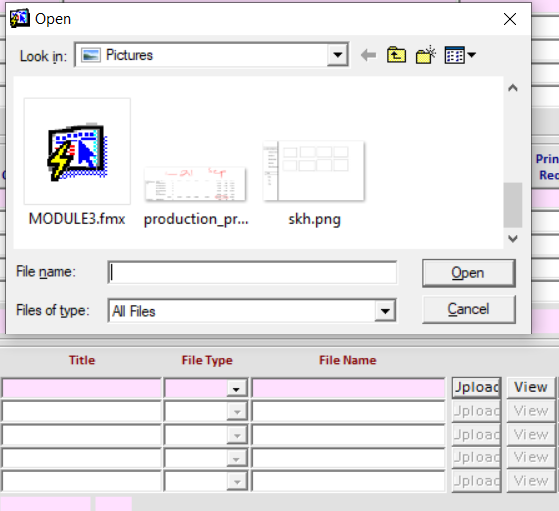
File Filter Syntax
The File_Filter parameter uses this format:
'Description (*.extension)|*.extension|Description2 (*.*)|*.*|'Example:
GET_FILE_NAME(File_Filter => 'Images (*.jpg, *.png)|*.jpg;*.png|PDF Files (*.pdf)|*.pdf|')This shows a dropdown with three options: Images, PDF Files, or All Files.
The Original Code (and What’s Wrong With It)
Most Oracle Forms file copy examples you’ll find on forums look something like this:
-- TYPICAL BUGGY EXAMPLE FROM FORUMS
DECLARE
    filename   VARCHAR2(500);
    TYP        VARCHAR2(5);
BEGIN
    filename := GET_FILE_NAME(File_Filter => 'All Files |*.*|');
    IF filename IS NOT NULL THEN
        IF :FILE_TYPE = 'I' THEN
            :FILE_NAME := :DOC.DOC_NO || '_' || :DOC.REC_COUNT || '_' || :DOC.SR_NO || '.JPG';
            HOST('cmd /c copy ' || filename || ' ' ||
            '\\172.16.1.0\share\DETAIL\' ||
            :DOC.DOC_NO || '_' || :DOC.REC_COUNT || '_' || :DOC.SR_NO || '.JPG' || ' /Y');
        ELSIF :FILE_TYPE = 'E' THEN
            TYP := SUBSTR(filename, INSTR(filename, '.'));
            :FILE_NAME := :DOC.DOC_NO || '_' || :DOC.REC_COUNT || '_' || :DOC.SR_NO || TYP;
            HOST('cmd /c copy ' || filename || ' ' || '\\172.16.1.0\share\DETAIL\' || ... || TYP || ' /Y');
        END IF;
        IF NOT Form_Success THEN
            Message('Error ___CLINE_1___
ELSE
Message('Upload Success.');
            COMMIT;
        END IF;
    END IF;
EXCEPTION
    WHEN OTHERS THEN
    message(dbms_error_Text);
END;
This code looks reasonable but has multiple serious bugs. Let’s fix them one by one.
7 Critical Bugs in Most Examples
Bug 1: Unquoted Paths (Spaces Break Everything)
The HOST command passes a string to the operating system. If any path contains spaces (like C:\My Documents\file.jpg), the OS interprets C:\My as the filename and Documents\file.jpg as a separate argument. The copy fails silently.
Fix: Wrap all paths in double quotes:
HOST('cmd /c copy "' || filename || '" "\\server\share\' || target || '" /Y');Bug 2: INSTR(filename, ‘.’) Finds the FIRST Dot
For a path like C:\v1.2\report.pdf, INSTR(filename, ‘.’) returns the position of the dot in v1.2, giving you .2\report.pdf as the “extension.” This is clearly wrong.
Fix: Use INSTR(filename, ‘.’, -1) to search from the end of the string:
TYP := SUBSTR(filename, INSTR(filename, '.', -1));Bug 3: Form_Success Does NOT Reflect HOST Results
This is the biggest myth in Oracle Forms development. Oracle’s documentation explicitly states:
“FORM_SUCCESS will return FALSE if the command fails for any reason (unless you’re on Windows 95 in which case it will still return TRUE)”
Even on modern Windows, HOST launches an external process asynchronously. Form_Success often returns TRUE even when the copy fails. Your “success” message is unreliable.
Fix: Don’t rely on Form_Success. Instead, verify the file exists after the copy:
-- After HOST command, check if target exists
HOST('cmd /c if exist "\\server\share\' || target || '" (echo FOUND) else (echo MISSING) > temp_check.txt');
-- Or better: use WebUtil's FILE_EXISTS
Bug 4: No File Type Validation
Users can select any file type. If the form expects a JPG but the user selects an EXE, the code blindly copies it. This is a security risk.
Fix: Validate the extension before copying:
v_ext := UPPER(SUBSTR(v_source_file, INSTR(v_source_file, '.', -1)));
IF v_ext NOT IN ('.JPG', '.JPEG', '.PNG', '.PDF') THEN Message('Invalid file type. Please select JPG, PNG, or PDF.');
RETURN;

END IF;
Bug 5: Silent Overwrites with /Y
The /Y flag overwrites existing files without prompting. If two records generate the same filename, data is lost.
Fix: Remove /Y or add a timestamp/sequence to filenames:
v_target := v_base_name || '_' || TO_CHAR(SYSDATE, 'YYYYMMDDHH24MISS') || v_ext;Bug 6: No Error Handling for Network Failures
If the network share is unreachable, HOST may hang for 30+ seconds before timing out. The user sees a frozen screen with no explanation.
Fix: Use a wrapper script with timeout, or check connectivity first:
HOST('cmd /c ping -n 1 -w 1000 \\server > nul && copy ...');Bug 7: Duplicated Message() Calls
In Oracle Forms, calling Message() once puts the text on the status bar. Calling it twice displays a modal alert box. While this works, it’s a quirk that confuses maintainers.
Fix: Use Message() twice intentionally (with a comment), or use Alert for proper dialogs.
The Fixed, Production-Ready Code
Here’s the complete trigger with all fixes applied. Block and item names have been changed to generic ones for reusability.
-- TRIGGER: WHEN-BUTTON-PRESSED on block UPLOAD_CTRL
-- PURPOSE: Copy a user-selected file to a network share with proper validation
DECLARE
    -- File paths
    v_source_file     VARCHAR2(500);
    v_target_file     VARCHAR2(500);
    v_target_path     VARCHAR2(500);
    v_extension       VARCHAR2(20);
    -- Record identifiers (adjust to your block names)
    v_doc_id          VARCHAR2(50)            := :UPLOAD_CTRL.DOC_ID;
    v_rec_count       VARCHAR2(10)            := :UPLOAD_CTRL.REC_COUNT;
    v_seq_no          VARCHAR2(10)            := :UPLOAD_CTRL.SEQ_NO;
    v_file_type       VARCHAR2(5)             := :UPLOAD_CTRL.FILE_TYPE;
    -- Network share base path (define once)
    c_network_share   CONSTANT VARCHAR2(200)  := '\\192.168.1.100\share\UPLOADS\';
    -- Allowed extensions
    TYPE t_ext_list IS TABLE OF VARCHAR2(10);
    v_allowed_exts    t_ext_list              := t_ext_list('.JPG', '.JPEG', '.PNG', '.PDF');
    -- Flag for validation
    v_ext_valid       BOOLEAN                 := FALSE;
BEGIN
    -- ============================================
    -- STEP 1: Let user select a file
    -- ============================================
    -- For Forms 6i (client-server): GET_FILE_NAME
    -- For Forms 10g+ (web): Use CLIENT_GET_FILE_NAME with WebUtil
    v_source_file := GET_FILE_NAME(File_Filter => 'Images and PDFs|*.jpg;*.jpeg;*.png;*.pdf|All Files|*.*|');
    -- Handle user cancellation
    IF v_source_file IS NULL THEN
        Message('No file selected. Operation cancelled.');
        RETURN;
    END IF;
    -- ============================================
    -- STEP 2: Extract and validate file extension
    -- ============================================
    -- Use LAST dot, not first (fixes Bug #2)
    v_extension := UPPER(SUBSTR(v_source_file, INSTR(v_source_file, '.', -1)));
    -- Validate extension
    FOR i IN 1..v_allowed_exts.COUNT LOOP
        IF v_extension = v_allowed_exts(i) THEN
            v_ext_valid := TRUE;
            EXIT;
        END IF;
    END LOOP;
    IF NOT v_ext_valid THEN
        Message('Invalid file type: ' || v_extension);
        Message('Allowed types: JPG, JPEG, PNG, PDF');
        RETURN;
    END IF;
    -- ============================================
    -- STEP 3: Build target filename based on FILE_TYPE
    -- ============================================
    -- This example forces .JPG for images (FILE_TYPE = 'I')
    -- Adjust the CASE statement to match your business rules
    IF v_file_type = 'I' THEN
        -- Force JPG extension for images
        v_target_file := v_doc_id || '_' || v_rec_count || '_' || v_seq_no || '.JPG';
    ELSIF v_file_type = 'E' THEN
        -- Keep original extension
        v_target_file := v_doc_id || '_' || v_rec_count || '_' || v_seq_no || v_extension;
    ELSIF v_file_type = 'P' THEN
        -- Force PDF extension
        v_target_file := v_doc_id || '_' || v_rec_count || '_' || v_seq_no || '.PDF';
    ELSE
        Message('Invalid FILE_TYPE: ' || v_file_type);
        RETURN;
    END IF;
    v_target_path := c_network_share || v_target_file;
    -- ============================================
    -- STEP 4: Copy the file (with proper quoting)
    -- ============================================
    -- Quote both paths to handle spaces (fixes Bug #1)
    -- Use cmd /c to execute and return
    HOST('cmd /c copy "' || v_source_file || '" "' || v_target_path || '"');
    -- ============================================
    -- STEP 5: Update form field and commit
    -- ============================================
    :UPLOAD_CTRL.FILE_NAME := v_target_file;
    -- Show success message (twice for modal display)
    Message('Upload successful: ' || v_target_file);
    Message('Upload successful: ' || v_target_file);
    COMMIT;
EXCEPTION
    WHEN OTHERS THEN
    -- Log and display error
    Message('Error during file copy: ' || DBMS_ERROR_TEXT);
    Message('Error during file copy: ' || DBMS_ERROR_TEXT);
    -- Optional: ROLLBACK;
END;
The Form_Success Myth: Why Your Error Check Is Broken
Many forum posts claim you can check if HOST succeeded using IF NOT Form_Success THEN. This is wrong in most cases.
Oracle’s official documentation confirms:
“On Windows 95 platforms, the FORM_SUCCESS built-in always returns TRUE for failed HOST commands. This includes calls to command.com or OS functions, any 16-bit DOS or GUI application, or invalid commands.”
Even on Windows NT and later, HOST runs asynchronously. Form_Success reflects whether the command was launched, not whether it completed successfully.
How to Actually Verify Success
You have three options:
Option 1: Check File Existence with WebUtil (Best for Oracle Forms 10g+)
plsql
IF WEBUTIL_FILE.FILE_EXISTS(v_target_path, 'SERVER') THEN

Message('File copied successfully.');

ELSE

Message('File copy failed.');

END IF;
Option 2: Use a Temp File as a Flag
plsql
-- Create a temp file only if copy succeeds

HOST('cmd /c copy "' || v_source || '" "' || v_target || '" && echo SUCCESS > ' || v_temp_flag);

-- Then read the temp file to check
Option 3: Wwe Batch File with Exit CodeCreate a .bat file that returns an error level, then use HOST to run it and check Form_Success on the batch result.
Modern Alternatives: WebUtil and Beyond
CLIENT_GET_FILE_NAME (WebUtil)
For web-deployed Forms (10g, 11g, 12c), replace GET_FILE_NAME with:
v_source_file := CLIENT_GET_FILE_NAME(File_Filter => 'All Files |*.*|');This requires WebUtil to be properly configured in your environment. You need:
- webutil.pll attached to your form
- webutil.olb in your Object Groups
- frmwebutil.jar in your CLASSPATH
- WEBUTIL_CONFIG environment variable pointing to webutil.cfg
WEBUTIL_FILE_TRANSFER.CLIENT_TO_AS
This WebUtil procedure transfers files directly from client to application server without HOST:
plsql
WEBUTIL_FILE_TRANSFER.CLIENT_TO_AS(

client_file => v_source_file,

server_file => v_target_file,

transfer_type => WEBUTIL_FILE_TRANSFER.TRANSFER_TYPE_BINARY

);
This is more reliable than HOST because it returns proper error codes and doesn’t rely on OS commands.
When to Use HOST vs. WebUtil
| Scenario | Recommendation |
|---|---|
| Forms 6i (client-server) | GET_FILE_NAME + HOST |
| Forms 10g+ (web) with WebUtil | CLIENT_GET_FILE_NAME + CLIENT_HOST |
| Forms 10g+ without WebUtil | Cannot access client filesystem |
| Large files (>10 MB) | WebUtil (better error handling) |
| Production security matters | WebUtil (no command injection risk) |
Security Considerations
Command Injection Risks
The HOST built-in executes OS commands. If any part of the command string comes from user input (like a filename), an attacker could inject additional commands.
Example attack: User names a file “file.jpg” & del C:\*.* & “This could delete files on the server.
Mitigation:
- Never trust user input in HOST commands
- Quote and escape all paths
- Prefer WebUtil which doesn’t use OS commands
UNC Path Permissions
The Oracle Forms process must have:
- Read access to the source file (client machine)
- Write access to the network share
If permissions are missing, the copy fails silently.
Always validate the file extension before copying. Don’t rely on the file dialog filter—users can override it.
Common Mistakes and Edge Cases
| Mistake | Fix | ||
|---|---|---|---|
| Spaces in filename | Quote paths: ‘”‘ || filename || ‘”‘ | ||
| Extension extraction | INSTR(filename | ‘.’ | -1) for last dot |
| Network share down | Add timeout or ping check | ||
| Zero-byte file | Validate DBMS_LOB.GETLENGTH or file size | ||
| Unicode filename | Use NLSLANG setting or WebUtil | ||
| Very long paths (>260 chars) | Windows limit; use shorter names | ||
| Client without cmd.exe | Use WebUtil or Unix-specific commands |
Frequently Asked Questions (FAQ)
Q1: How Upload File using Oracle forms with Shared Drive?
Q2: How do I handle filenames with spaces?Quote the path in the HOST command: ‘”‘ || filename || ‘”‘.
Q3: What’s the correct way to get file extension or file picker in oracle forms? SUBSTR(filename, INSTR(filename, ‘.’, -1)) — uses the last dot.
Q4: Can I use GET_FILE_NAME in web-deployed Forms? No. Use CLIENT_GET_FILE_NAME from WebUtil instead.
Q5: Is HOST safe ?No, not without strict input validation. Command injection is possible. Prefer WebUtil.
Q6: How do I prevent overwriting existing files?Remove the /Y flag, or append a timestamp to filenames.
Q7: What if the network share is unreachable?HOST may hang. Use CLIENT_HOST with WebUtil (non-blocking) or add a ping check.
Q8: Can I upload files larger than 10 MB?HOST works but blocks the UI. WebUtil’s CLIENT_TO_AS is better for large files.
Key Takeaways
- GET_FILE_NAME works in 6i but searches the server in 10g+ unless using WebUtil
- Form_Success is unreliable with HOST — always verify results separately
- Quote paths to handle spaces in filenames
- Use INSTR(filename, ‘.’, -1) for correct extension extraction
- WebUtil is the modern replacement for web-deployed Forms
- Validate file types before copying
Conclusion & Next Steps
Copying files in Oracle Forms to remote location you can follow this guide full and code.
For web deployments, migrate to WebUtil’s CLIENT_GET_FILE_NAME and WEBUTIL_FILE_TRANSFER.CLIENT_TO_AS. Yes, it requires configuration, but it’s the only supported path for client file access in Forms 10g and later.