20 Most Common Oracle Reports Common Errors (REP xxxx) and Their Fixes
Oracle Reports errors have a reputation problem. The error messages are often cryptic, the causes are rarely obvious, and the fixes frequently require a combination of experience, guesswork, and brute-force trial-and-error. A developer can spend hours staring at a REP-1212 message before realizing the issue is a single character width in a frame.
This guide covers the 20 most common REP-xxxx errors you will encounter when developing, testing, and deploying Oracle Reports. Each entry explains what the error actually means, why it happens, and the exact steps to fix it.
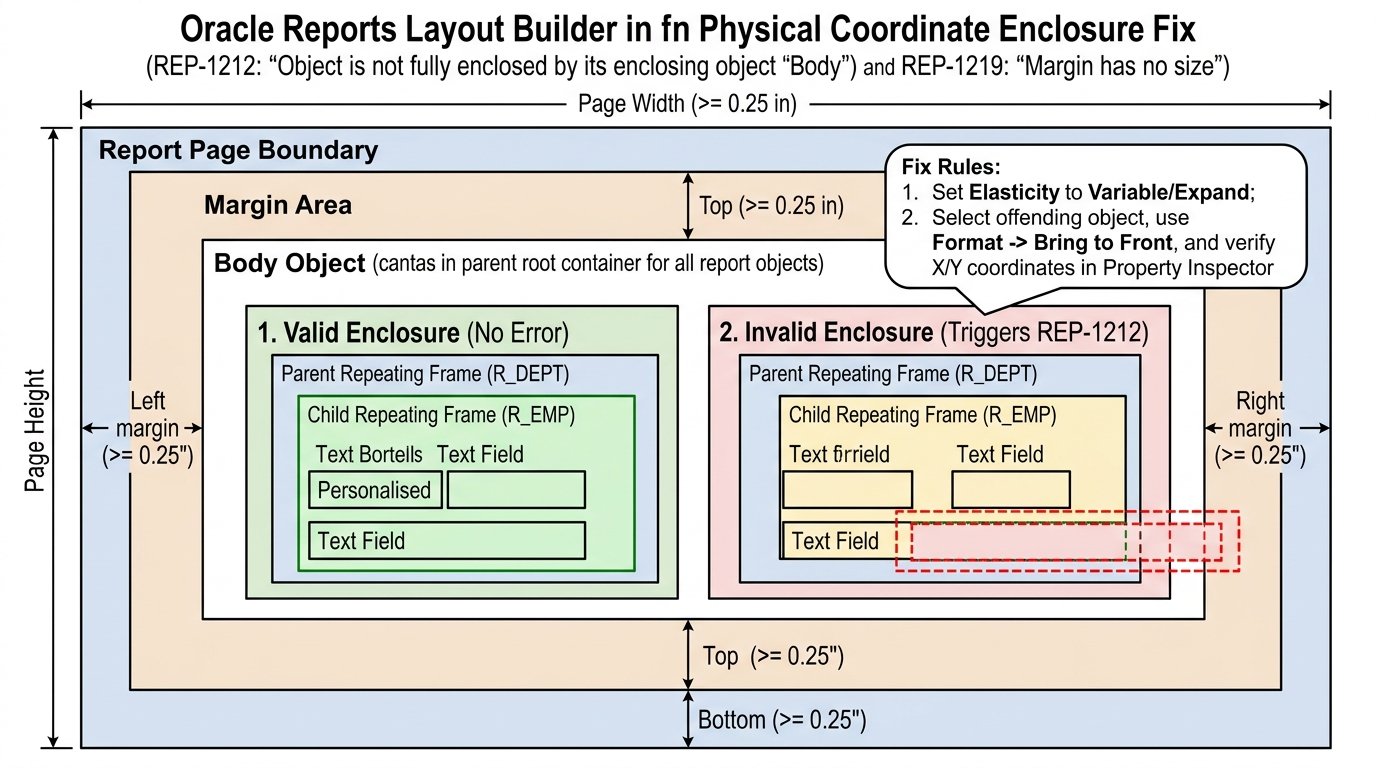
1. REP-1212: Object is not fully enclosed by its enclosing object ‘Body’
What it means: A layout object (field, frame, or repeating frame) extends beyond the boundaries of its parent container. The most common culprit is the report Body frame.
Why it happens:
- You increased the number of columns or the width of the report without adjusting the Body frame
- A field’s width or position causes it to cross the Body frame boundary
- The report is running in Character Mode (required for Oracle E-Business Suite integration) and objects are not aligned to the character grid
How to fix it:
- Open the report in Reports Builder
- Switch to Character Mode view if you are deploying to EBS
- Locate the offending object in the Object Navigator
- Either reduce the object’s width or reposition it so it fits within the Body frame
- Alternatively, expand the Body frame to accommodate the object
Pro tip: The error message sometimes does not identify the specific object. In that case, systematically hide or delete layout objects until the error disappears, then restore them one by one .
2. REP-1219: ‘margin’ has no size — length or width is zero
What it means: A frame or field has a width or height of zero (or less than one character cell in Character Mode).
Why it happens:
- A field’s width was reduced below the minimum viable size during layout modifications
- A frame was accidentally resized to have no visible dimensions
How to fix it:
- Identify the field or frame referenced in the error
- In the Property Inspector, check the Width and Height properties
- Increase both to at least one character cell (in Character Mode) or a positive value in inches/centimeters
- If the frame contains fields, ensure those fields also have adequate width
3. REP-1401: ‘query_name’: Fatal PL/SQL error occurred
What it means: A PL/SQL block associated with a query (typically a ref cursor) failed during execution. The query_name is usually the auto-generated name of a query, such as qr_1refcurds .
Common causes:
- Data type mismatch in ref cursor: A package specification defines a field type incorrectly, causing the returned data to not match what the report expects
- Division by zero in a formula column or PL/SQL function
- Insufficient privileges: The report runs fine interactively but fails when executed via a role that lacks necessary table grants
- Known bug on MS Windows: Dynamic ref cursors fail with REP-1401 and virtual memory errors on certain Reports 10g versions
How to fix it:
- Check package specifications: If your report uses a ref cursor from a package, verify that the field order and data types in the package spec match the body
- Test the query independently: Run the SQL or function directly in SQL*Plus to confirm it returns data
- Add exception handling: Wrap the PL/SQL block with WHEN OTHERS THEN to capture the actual SQL error
- Apply Oracle patches: If on Windows 10g, check for patches 4505133 and 5634746
4. REP-00499: Column {0} selected by the query is incompatible with the report definition
What it means: The database column definition has changed since the report was last defined, or an external query has been modified .
Why it happens:
- A column’s data type was changed (e.g., VARCHAR2 to NUMBER)
- A column was dropped or renamed
- An external query’s structure changed
How to fix it:
- Open the report in Reports Builder
- Re-accept the SQL query by opening the query dialog and clicking OK
- Update any formulas, summaries, or fields that reference the changed column
- If using an external query, re-accept it and update dependent objects
5. REP-1401 with “Virtual Memory System error” on Windows
What it means: A specific variant of REP-1401 that occurs on MS Windows platforms with ref cursor reports.
Why it happens: This is a known Oracle bug affecting dynamic ref cursors in Reports 10g on Windows .
How to fix it:
- Log into Oracle Support and download patches 4505133 and 5634746
- Follow the instructions in Oracle Note 430044.1 to apply the patches
- This is a platform-specific bug; Linux/Unix deployments are not affected
6. REP-00773: No Source was specified for Parameter Form Field {0}
What it means: A parameter form field has no source specified, or the source parameter was deleted from the data model .
How to fix it:
- Open the Parameter Form in Reports Builder
- Select the field referenced in the error
- In the Property Inspector, set the Source property to a valid parameter
- If the source parameter was deleted, recreate it in the Data Model or choose a different parameter
7. REP-00775: The data type of the first column of the SELECT statement does not match the data type of LOV parameter {0}
What it means: A List of Values (LOV) parameter’s data type does not match the first column returned by its SELECT statement .
How to fix it:
- Identify the LOV parameter from the error message
- Check the parameter’s data type in the Property Inspector
- Check the SELECT statement’s first column data type
- Ensure they match (e.g., both NUMBER, both VARCHAR2)
8. REP-00781: Bind variables are not allowed in the SELECT statement
What it means: A bind variable (e.g., :parameter_name) was used in a SELECT statement that populates an LOV parameter .
How to fix it:
- Open the LOV parameter’s SELECT statement
- Remove all bind variables (:variable_name)
- Replace them with lexical references (¶meter_name) if dynamic substitution is needed, or use literal values
9. REP-00787: The name of the first column of LOV parameter {0}’s select statement is not the same at runtime as design time
What it means: The database table structure changed after the LOV parameter was defined .
How to fix it:
- Re-open the LOV parameter’s SELECT statement in Reports Builder
- Accept the statement again so the report picks up the current column names
- Test the LOV at runtime
10. REP-00774: No selectable values are available for LOV parameter {0}
What it means: The LOV parameter’s SELECT statement returned no rows, or the values returned cannot be selected .
How to fix it:
- Run the SELECT statement directly in SQL*Plus to verify it returns data
- Check that the parameter’s values are not filtered out by runtime conditions
- Verify that the database user has SELECT privileges on the underlying tables
11. REP-52001: The key map file {0} cannot be read
What it means: The Reports Server cannot read its key map file, which is used for secure parameter passing .
How to fix it:
- Verify the key map file exists in ORACLE_HOME/reports/conf
- Check file permissions (the Reports Server user must have read access)
- Verify the file contains valid key-value entries
12. REP-52002: The key map file {0} cannot be parsed
What it means: The key map file exists but contains invalid syntax .
How to fix it:
- Open the key map file in a text editor
- Verify that each line follows the format key=value
- Check for encoding issues (the file should be plain ASCII)
- Restore from a backup if the file was corrupted
13. REP-52003: Read Reports template {0} failed
What it means: The Reports Servlet template file cannot be read .
How to fix it:
- Verify the template file exists in ORACLE_HOME/reports/templates
- Check file permissions
- Ensure the file was not accidentally deleted or renamed
14. REP-52005: The specified key {0} does not exist in the key map file
What it means: A request referenced a key that is not defined in the key map file .
How to fix it:
- Check the key name in the report invocation
- Add the missing key to the key map file
- Restart the Reports Server after modifying the key map
15. REP-56116: A relative path for desname {0} is not allowed when destype=file
What it means: When sending a report to a file, the destination name must be an absolute path .
How to fix it:
- Change the desname parameter to use an absolute path
- Example: Instead of desname=output.pdf, use desname=/u01/reports/output.pdf
16. REP-56122: Reports Server {0} cannot be connected
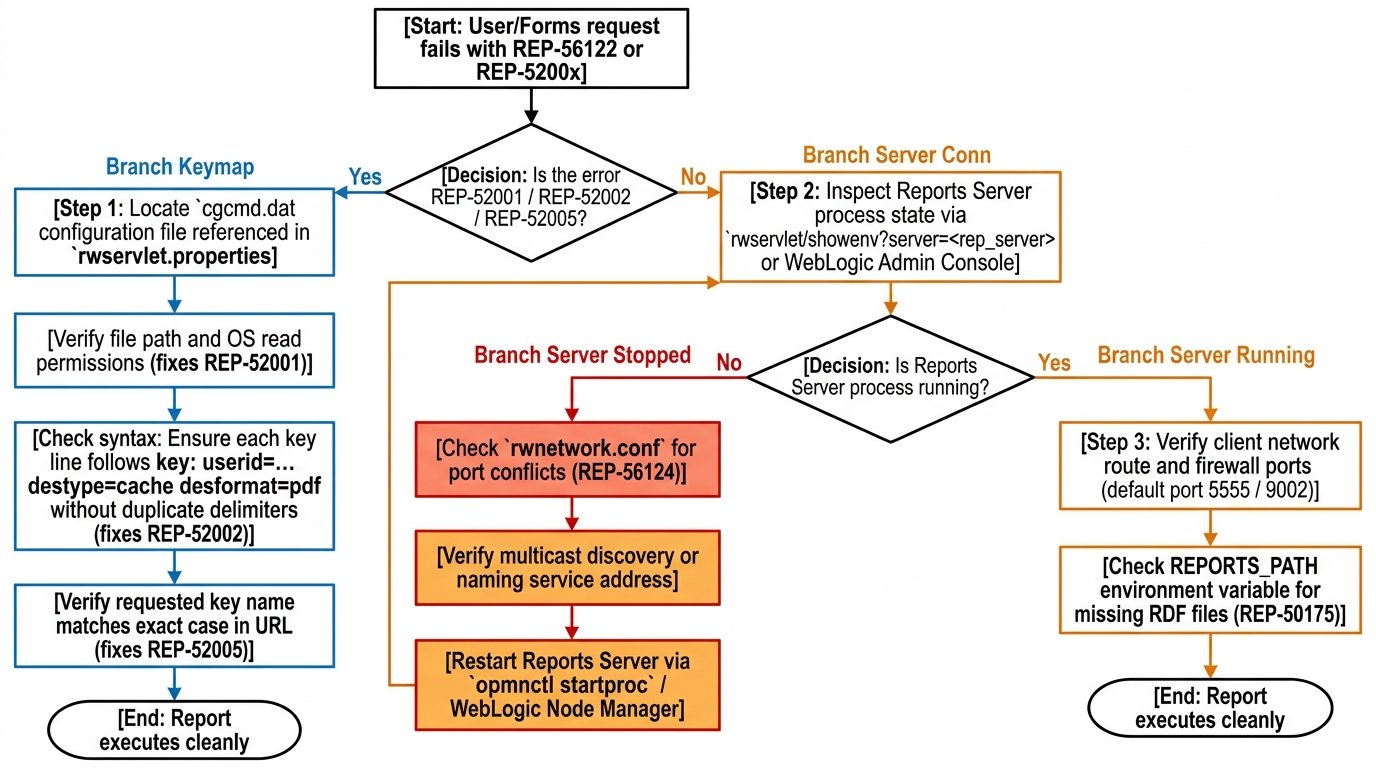
What it means: The Reports Server is not running, or the server name is incorrect .
How to fix it:
- Verify the Reports Server is running
- Check the server name in tnsnames.ora matches the server parameter
- Test connectivity using rwservlet?cmd=showjobs in a browser
17. REP-56124: Report Server failed to start; port {0} specified in the server config file may already be in use
What it means: The Reports Server cannot bind to its configured port because another process is using it .
How to fix it:
- Check which process is using the port: netstat -an | grep <port>
- Either stop the conflicting process or change the Reports Server’s port in the configuration file
- Restart the Reports Server
18. REP-50175: File {0} cannot be found
What it means: Oracle Reports cannot locate a file referenced in the report or command line .
How to fix it:
- Check the file path in the report definition or command line
- Verify the file exists on the file system
- Check permissions on the file and its parent directories
- For reports deployed to a server, ensure the file is on the server’s file system, not the client’s
19. REP-1800: Printer validation error (UNIX)
What it means: Reports cannot validate the specified printer, often because REPORTS_NO_DUMMY_PRINTER is not set or the printer configuration is invalid .
How to fix it:
- Ensure REPORTS_NO_DUMMY_PRINTER is set (required at all times)
- Verify the printer is configured in uiprint.txt
- If no valid printer exists, set TK_PRINT_STATUS=echo and add a dummy entry to uiprint.txt
20. REP-01423: Maximum rows of a query cannot be set after the query started executing
What it means: SRW.SET_MAXROW was called after the query already began fetching rows .
How to fix it:
- Move the SRW.SET_MAXROW call to the Before Report trigger
- Ensure it executes before any query begins fetching data
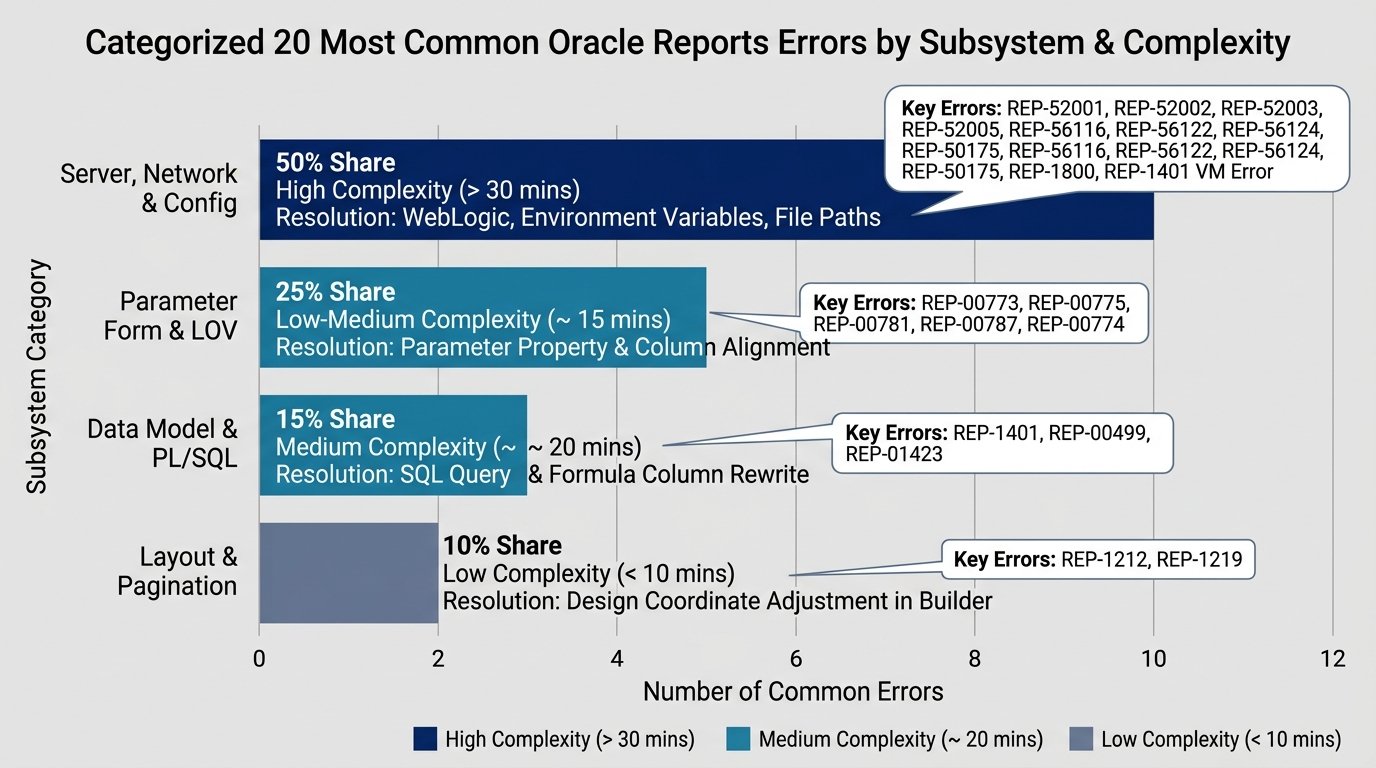
Quick Reference Table
| # | Error | Category | One-Line Fix |
|---|---|---|---|
| 1 | REP-1212 | Layout | Adjust frame boundaries |
| 2 | REP-1219 | Layout | Increase field/frame size |
| 3 | REP-1401 | PL/SQL | Check ref cursor data types |
| 4 | REP-00499 | Query | Re-accept SQL query |
| 5 | REP-1401 (VM) | Platform | Apply Oracle patches |
| 6 | REP-00773 | Parameter | Set parameter source |
| 7 | REP-00775 | Parameter | Match data types |
| 8 | REP-00781 | Parameter | Remove bind variables |
| 9 | REP-00787 | Parameter | Re-accept SELECT |
| 10 | REP-00774 | Parameter | Verify query returns data |
| 11 | REP-52001 | Server | Check key map file |
| 12 | REP-52002 | Server | Fix key map syntax |
| 13 | REP-52003 | Server | Verify template exists |
| 14 | REP-52005 | Server | Add missing key |
| 15 | REP-56116 | Server | Use absolute path |
| 16 | REP-56122 | Server | Start Reports Server |
| 17 | REP-56124 | Server | Free the port |
| 18 | REP-50175 | File | Verify file exists |
| 19 | REP-1800 | Printer | Set REPORTS_NO_DUMMY_PRINTER |
| 20 | REP-01423 | PL/SQL | Move to Before Report |
Final Thoughts
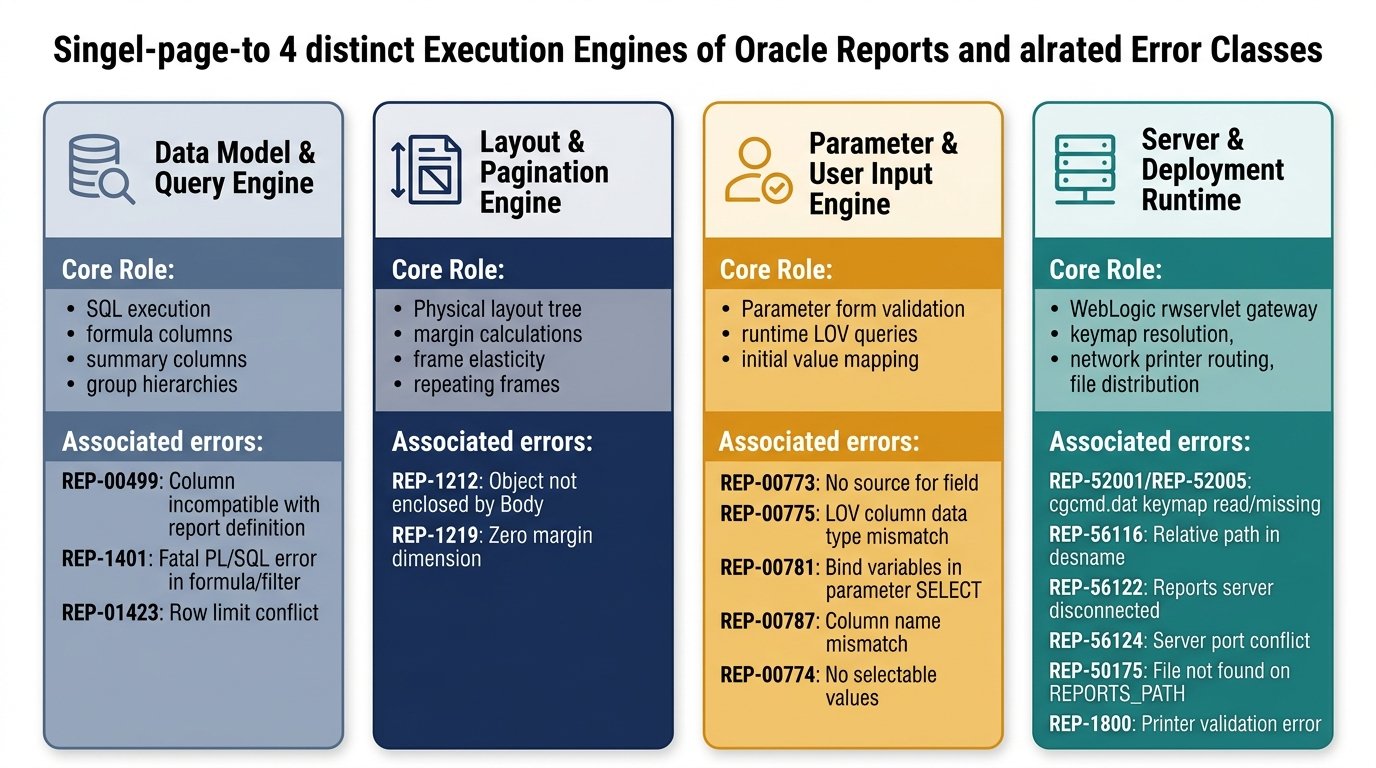
Oracle Reports errors follow patterns. Layout errors (REP-1212, REP-1219) almost always mean a frame or field is misaligned. PL/SQL errors (REP-1401) usually trace back to data type mismatches or privilege issues. Server errors (REP-56xxx) indicate configuration problems.
The key to efficient debugging is recognizing which category an error belongs to and applying the corresponding fix pattern. With this reference, you should be able to resolve most REP errors without opening a single support ticket.