
Calling Reports in 12c 14c Forms and reports
I will show you step-by-step tutorial for modern Oracle Forms
Introduction: Why Web.Show_Document Is the Standard in 12c
If you are migrating from Oracle Forms 6i or earlier, you already know that RUN_PRODUCT no longer works. In Oracle Forms 12c, using RUN_PRODUCT to call Reports results in a compilation error. The client/server runtime engine for Reports is gone. Everything is web-based now.
The replacement is a two-step pattern:
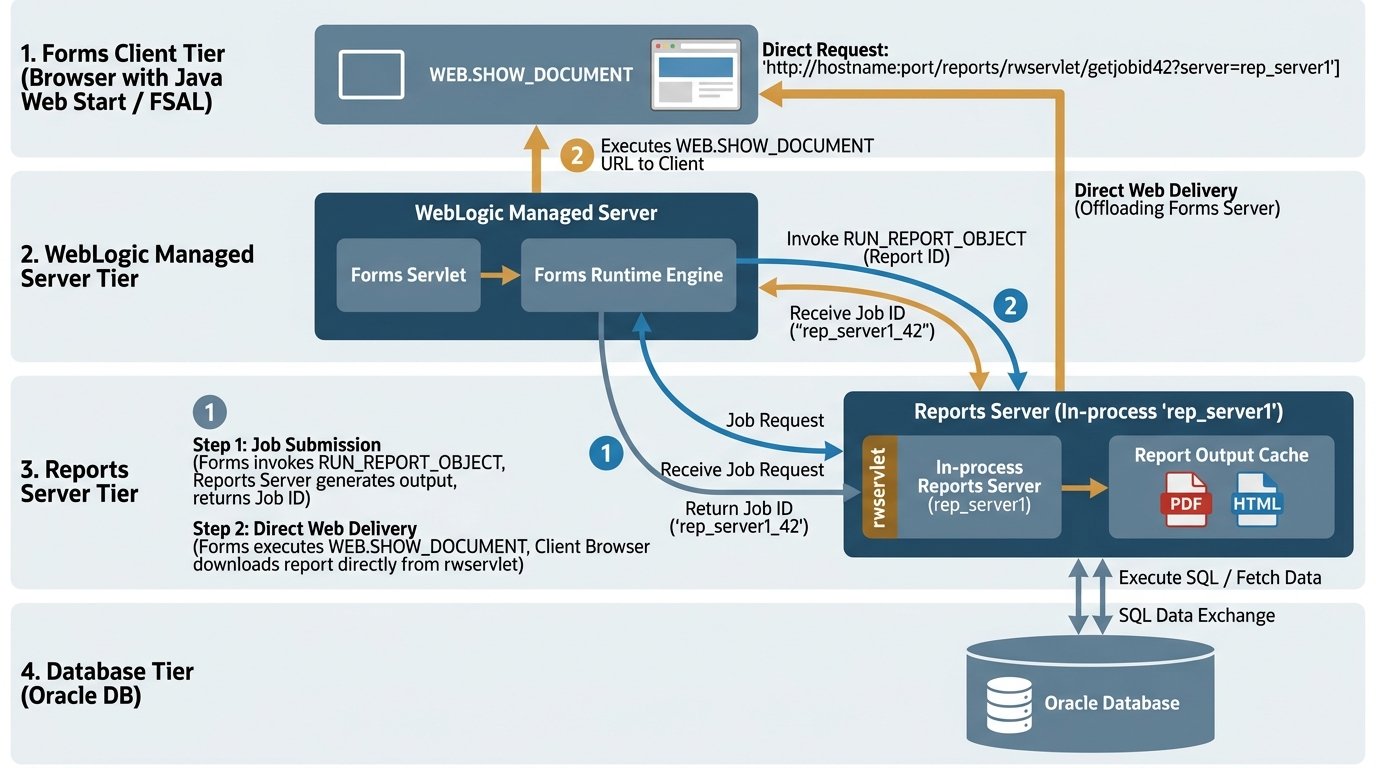
- RUN_REPORT_OBJECT — Kicks off the report generation on the Reports Server and returns a unique job ID.
- WEB.SHOW_DOCUMENT — Takes that job ID, constructs a URL, and instructs the client’s browser to load the report output.
This article focuses exclusively on WEB.SHOW_DOCUMENT — what it does, how to construct the URL correctly, and how to integrate it with RUN_REPORT_OBJECT for both synchronous and asynchronous report execution.
By the end, you will have working code patterns you can drop directly into your Oracle Forms 12c application.
What Exactly Does WEB.SHOW_DOCUMENT Do?
WEB.SHOW_DOCUMENT is a built-in procedure in the WEB package that passes a URL to the client’s default web browser. That is all it does.
Critical truth: Oracle Forms does not control the browser. It does not embed the report inside the form. It simply hands a URL to the browser and says “open this.” The browser then makes a request to the Reports Server, which serves the report output.
This has important implications:
- The Reports Server must be accessible from the client machine (not just the Forms Server).
- The URL must be properly formed with all required parameters.
- Authentication must be handled (typically via userid in the URL or Single Sign-On).
- Pop-up blockers may interfere with the new window.
WEB.SHOW_DOCUMENT(url VARCHAR2, destination VARCHAR2);| Parameter | Description | |
|---|---|---|
| url | The full or relative URL to the report output. | |
| destination | The browser target window. Must be lowercase | enclosed in single quotes. |
Destination values:
| Value | Behavior | |
|---|---|---|
| ‘_blank’ | Opens in a new | unnamed browser window (default). |
| ‘_self’ | Loads in the same frame or window as the source. | |
| ‘_parent’ | Loads in the parent frame or frameset. | |
| ‘_top’ | Loads in the full window | replacing all frames. |
| ‘windowName’ | Loads in a named window (created if it does not exist). |
Example — Simplest possible call:
WEB.SHOW_DOCUMENT('http://reports.example.com/reports/rwservlet?report=myreport.rdf', '_blank');This opens the report in a new browser window.
The URL: Where Everything Happens
The WEB.SHOW_DOCUMENT call itself is trivial. The complexity lives entirely in the URL. Get the URL wrong, and the report never loads.
URL Structure for Reports Servlet
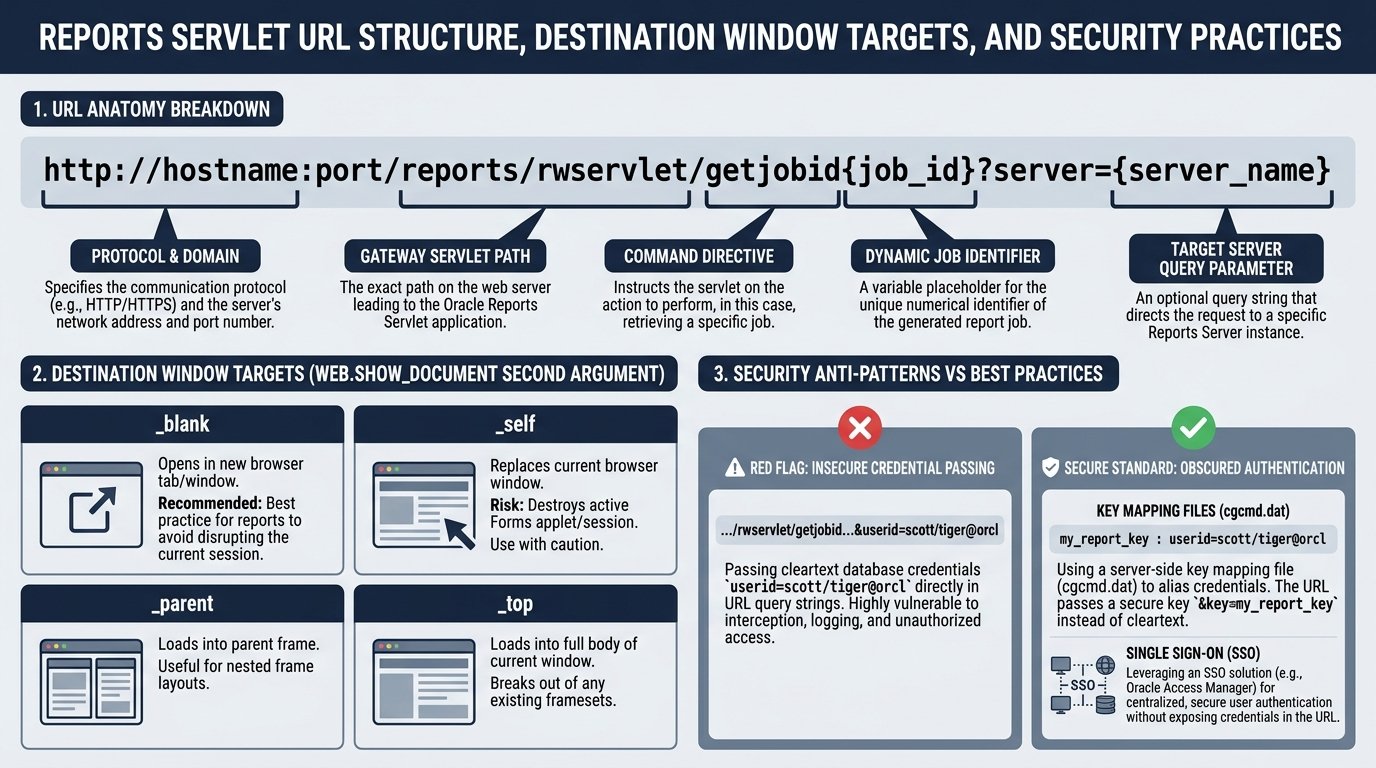
The standard Reports Servlet URL follows this pattern:
http://<hostname>:<port>/reports/rwservlet?<parameters>Parameters you will commonly use:
| Parameter | Purpose | Example |
|---|---|---|
| server | The Reports Server name (as defined in tnsnames.ora) | server=RepSvr |
| report | The .rdf file name | report=emp_report.rdf |
| desformat | Output format | desformat=pdf or desformat=htmlcss |
| destype | Destination type | destype=cache |
| userid | Database credentials | userid=scott/tiger@orcl |
| paramform | Show parameter form? | paramform=no |
| p_deptno | Custom parameter (example) | p_deptno=10 |
Full working example:
plsql
DECLARE
v_url VARCHAR2(2000);
BEGIN
v_url := 'http://reports.example.com:8888/reports/rwservlet'|| '?server=RepSvr'
|| '&report=emp_report.rdf' || '&desformat=pdf' || '&destype=cache'
|| '&userid=scott/tiger@orcl' || '¶mform=no' || '&p_deptno='
|| :EMP.DEPTNO; WEB.SHOW_DOCUMENT(v_url, '_blank');
END;Security warning: The userid=user/password@database pattern exposes credentials in the URL. For production systems, use Single Sign-On (SSO) or the ssoconn parameter instead of hardcoded credentials.
The Preferred Pattern: RUN_REPORT_OBJECT + WEB.SHOW_DOCUMENT
Directly constructing a Reports Servlet URL works, but it bypasses the Reports Object configuration in Forms. The recommended approach for Oracle Forms 12c is a two-step process:
- Use RUN_REPORT_OBJECT to submit the report and get a job ID.
- Use WEB.SHOW_DOCUMENT with the getjobid servlet command to display the completed output.
This gives you:
- Centralized report configuration (Report Object node in Forms).
- Proper status checking via REPORT_OBJECT_STATUS.
- Support for both synchronous and asynchronous execution.
Step-by-Step: Synchronous Report Call
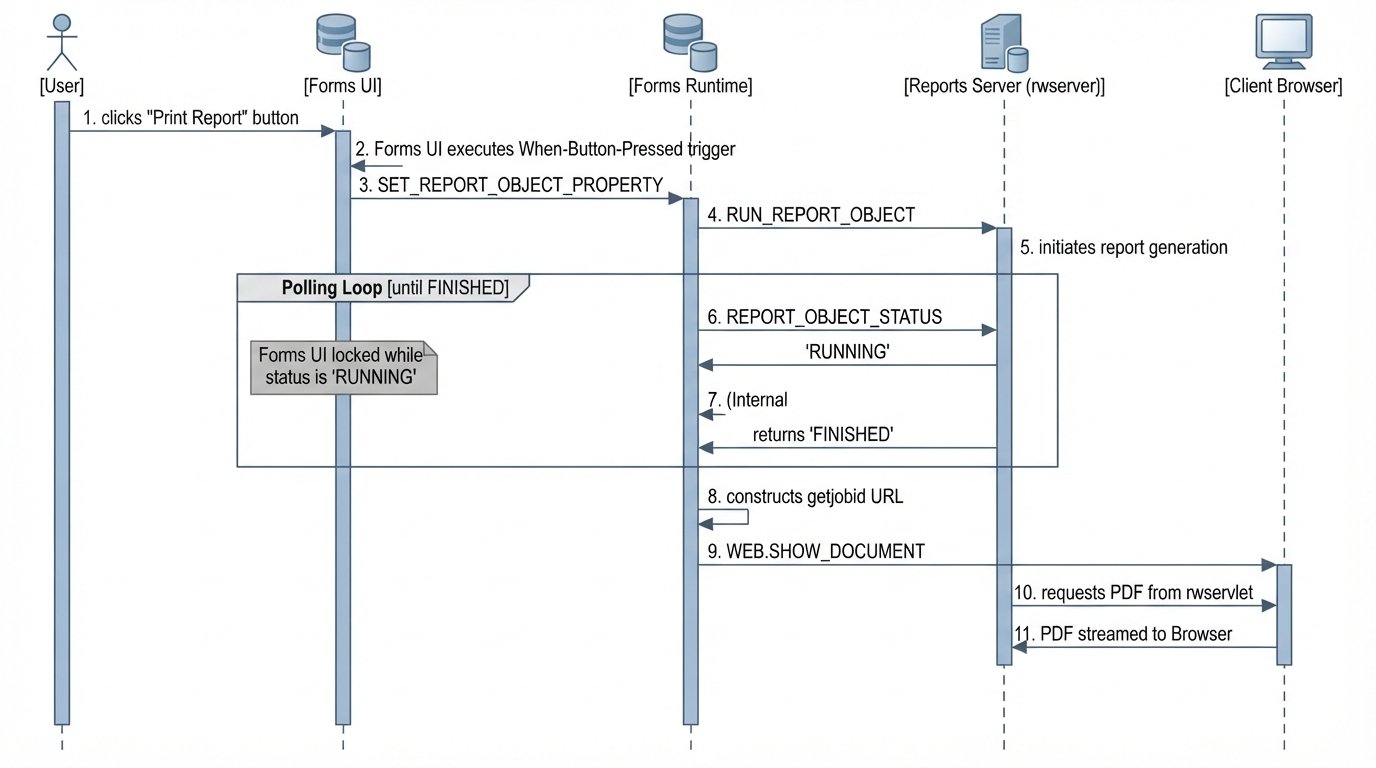
Synchronous means the user waits while the report generates. Good for fast reports (under 10 seconds). Bad for long-running reports.
Step 1 — Create a Report Object in Forms Builder
In the Object Navigator, right-click Report Objects → Create. Name it (e.g., REPORT_NODE1). In its Property Palette, set the Report Filename to your .rdf file (e.g., emp_report.rdf).
Step 2 — Write the When-Button-Pressed trigger:
plsql
DECLARE
v_report_id       REPORT_OBJECT;
v_job_id          VARCHAR2(100);
v_status          VARCHAR2(100);
v_url             VARCHAR2(2000);
BEGIN

-- Get handle to the Report Object
v_report_id := FIND_REPORT_OBJECT('REPORT_NODE1');
-- Configure the report
SET_REPORT_OBJECT_PROPERTY(v_report_id, REPORT_COMM_MODE, SYNCHRONOUS);
SET_REPORT_OBJECT_PROPERTY(v_report_id, REPORT_DESTYPE, CACHE);
SET_REPORT_OBJECT_PROPERTY(v_report_id, REPORT_DESFORMAT, 'PDF');
SET_REPORT_OBJECT_PROPERTY(v_report_id, REPORT_SERVER, 'RepSvr');
SET_REPORT_OBJECT_PROPERTY(v_report_id, REPORT_OTHER,'p_deptno=' || :EMP.DEPTNO || ' paramform=no');

-- Run the report, get job ID
v_job_id := RUN_REPORT_OBJECT(v_report_id);

-- Check status (synchronous call returns FINISHED or error)
v_status := REPORT_OBJECT_STATUS(v_job_id);

IF v_status = 'FINISHED' THEN
-- Extract the pure job ID (strip server name prefix if present)
v_job_id := SUBSTR(v_job_id, INSTR(v_job_id, '_') + 1);

-- Build the getjobid URL
v_url := 'http://reports.example.com:8888/reports/rwservlet/getjobid'|| v_job_id|| '?server=RepSvr';
WEB.SHOW_DOCUMENT(v_url, '_blank');
ELSE
MESSAGE('Report failed with status: ' || v_status);
RAISE FORM_TRIGGER_FAILURE;

END IF;

END;
Key points:
- REPORT_DESTYPE must be CACHE for web output. FILE and PRINTER do not work for browser display.
- REPORT_DESFORMAT can be PDF, HTMLCSS, XML, RTF, or DELIMITED.
- The getjobid servlet command retrieves the cached output by job ID.
- If the Reports Server is on the same host as the Forms Server, you can use a relative URL: /reports/rwservlet/getjobid…. For a remote server, use the full http://hostname:port/ prefix.
Step-by-Step: Asynchronous Report Call (Recommended for Long Reports)
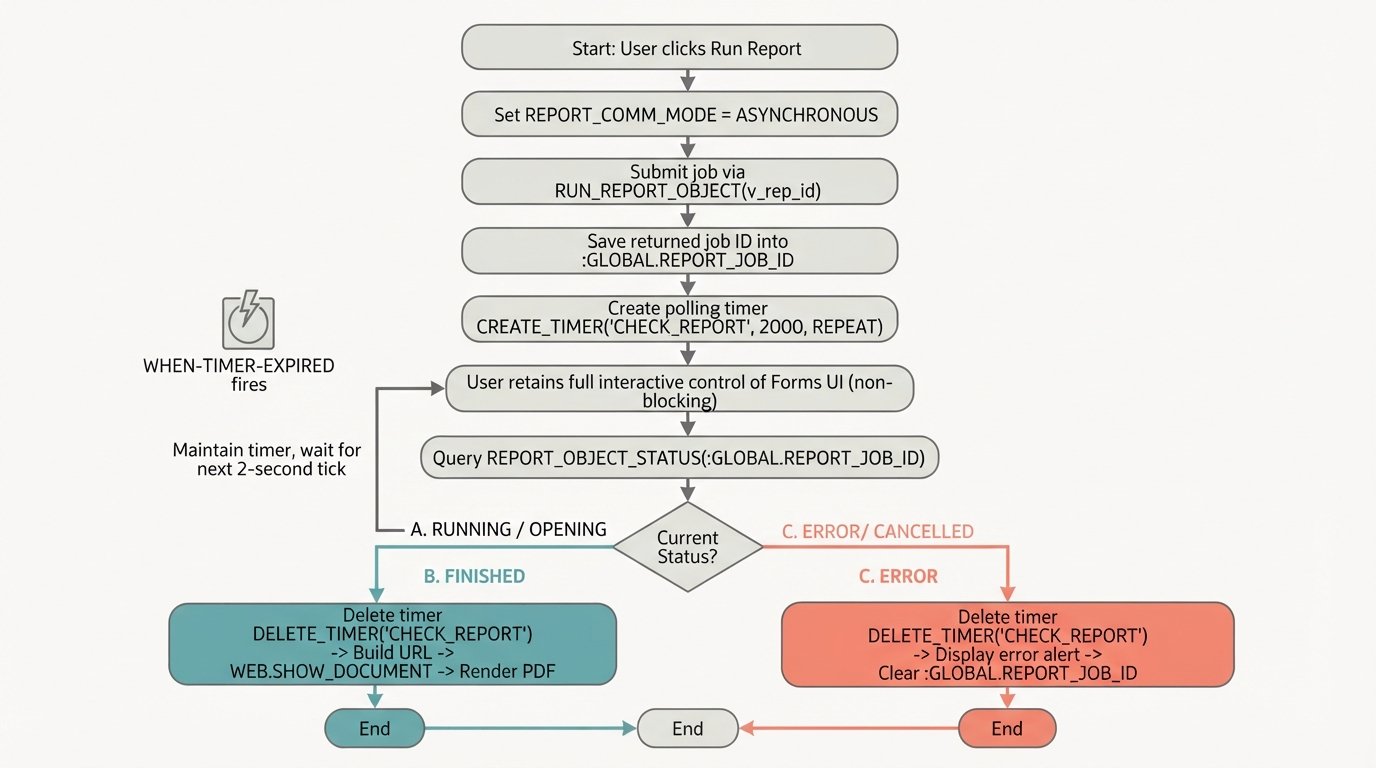
Asynchronous means the report runs in the background. The user is not blocked. A timer checks the status periodically. When done, the output is displayed.
Why use asynchronous? Synchronous calls force the user to wait. For reports that take 30+ seconds, this creates a poor experience and may trigger browser timeouts.
Architecture:
- When-Button-Pressed — Starts the report, stores job ID in a global variable, creates a timer.
- When-Timer-Expired — Fires every 10–15 seconds, checks REPORT_OBJECT_STATUS, calls WEB.SHOW_DOCUMENT when finished, deletes timer.
Step 1 — Start the report (When-Button-Pressed):
DECLARE
v_report_id REPORT_OBJECT;
BEGIN
v_report_id := FIND_REPORT_OBJECT('REPORT_NODE1');
-- Asynchronous configuration
SET_REPORT_OBJECT_PROPERTY(v_report_id, REPORT_EXECUTION_MODE, BATCH);
SET_REPORT_OBJECT_PROPERTY(v_report_id, REPORT_COMM_MODE, ASYNCHRONOUS);
SET_REPORT_OBJECT_PROPERTY(v_report_id, REPORT_DESTYPE, CACHE);
SET_REPORT_OBJECT_PROPERTY(v_report_id, REPORT_DESFORMAT, 'PDF');
SET_REPORT_OBJECT_PROPERTY(v_report_id, REPORT_SERVER, 'RepSvr');
SET_REPORT_OBJECT_PROPERTY(v_report_id, REPORT_OTHER,'p_deptno=' || :EMP.DEPTNO || ' paramform=no');
-- Start report, store job ID globally
:GLOBAL.REPORT_JOB_ID := RUN_REPORT_OBJECT(v_report_id);
-- Create timer (fires every 10 seconds)
:GLOBAL.REPORT_TIMER := CREATE_TIMER('REPORT_CHECK', 10000, REPEAT);
MESSAGE('Report is being generated. Please wait...');
END;
Step 2 — Check status (When-Timer-Expired):
DECLARE
v_status VARCHAR2(100);
v_job_id VARCHAR2(100);
v_url VARCHAR2(2000);
BEGIN
-- Only respond to our timer
IF GET_APPLICATION_PROPERTY(TIMER_NAME) != 'REPORT_CHECK' THEN
RETURN;
END IF;
v_status := REPORT_OBJECT_STATUS(:GLOBAL.REPORT_JOB_ID);
IF v_status = 'FINISHED' THEN
-- Delete timer first (avoid repeat)
DELETE_TIMER(:GLOBAL.REPORT_TIMER);
-- Clean job ID
v_job_id := SUBSTR(:GLOBAL.REPORT_JOB_ID,
INSTR(:GLOBAL.REPORT_JOB_ID, '_') + 1);
-- Build URL and display
v_url := 'http://reports.example.com:8888/reports/rwservlet/getjobid'
|| v_job_id
|| '?server=RepSvr';
WEB.SHOW_DOCUMENT(v_url, '_blank');
MESSAGE('Report ready.');
ELSIF v_status NOT IN ('RUNNING', 'OPENING_REPORT', 'ENQUEUED') THEN
-- Report failed
DELETE_TIMER(:GLOBAL.REPORT_TIMER);
MESSAGE('Report failed with status: ' || v_status);
END IF;
-- If still running, do nothing — timer will fire again
END;
Critical rules for asynchronous calls:
| Rule | Reason | ||
|---|---|---|---|
| Timer should fire no more than 4 times per minute | Performance; avoid overloading the Reports Server | ||
| Always delete the timer when done | Prevent endless firing | ||
| Use global variables for job ID and timer name | Shared between triggers | ||
| Check for statuses RUNNING | OPENING_REPORT | ENQUEUED as “still working” | Any other non-FINISHED status means failure |
The getjobid URL: Complete Breakdown
The URL used with WEB.SHOW_DOCUMENT for report output follows this pattern:
<protocol>://<hostname>:<port>/<reports_context>/rwservlet/getjobid<job_id>?server=<ReportServerName>Example:
http://reports.example.com:8888/reports/rwservlet/getjobid123456?server=RepSvrComponent breakdown:
| Component | Value | Notes | |
|---|---|---|---|
| http:// | Protocol | Use https:// for SSL | |
| reports.example.com | Reports Server host | Must be reachable from client | |
| :8888 | Port | Default is 8888 for WLS | varies by setup |
| /reports/ | Virtual path | Default Reports servlet context | |
| rwservlet | Servlet name | Default; CGI is rwcgi.sh (Unix) or rwcgi.exe (Windows) | |
| /getjobid | Servlet command | Retrieves cached output by job ID | |
| 123456 | Job ID | The numeric job ID from RUN_REPORT_OBJECT | |
| ?server=RepSvr | Server parameter | Matches the REPORT_SERVER property |
Relative vs Absolute URL:
- Same host as Forms Server: Use relative path — /reports/rwservlet/getjobid…
- Remote Reports Server: Use full URL — http://hostname:port/reports/rwservlet/getjobid…
Job ID extraction: The value returned by RUN_REPORT_OBJECT may include a server name prefix (e.g., RepSvr_123456). The getjobid command expects only the numeric portion. Use SUBSTR with INSTR to extract it:
plsql
v_job_id := SUBSTR(v_full_job_id, INSTR(v_full_job_id, '_') + 1);Passing Parameters to Reports
There are two ways to pass parameters when using WEB.SHOW_DOCUMENT with getjobid:
Option A — Via REPORT_OTHER (Recommended)
Set parameters in REPORT_OTHER before calling RUN_REPORT_OBJECT. The parameters become part of the report job, and getjobid automatically includes them.
plsql
SET_REPORT_OBJECT_PROPERTY(v_report_id, REPORT_OTHER,'p_deptno=' || :EMP.DEPTNO || ' p_year=' || :PARAM.YEAR || ' paramform=no');Option B — Directly in URL (Not recommended for getjobid)
When using getjobid, the parameters are already baked into the job. Do not try to pass additional runtime parameters in the WEB.SHOW_DOCUMENT URL.
System parameters (DESTYPE, DESFORMAT, SERVER) must be set via SET_REPORT_OBJECT_PROPERTY, not in REPORT_OTHER. User-defined parameters (like p_deptno) go in REPORT_OTHER.
Common Pitfalls and How to Avoid Them
Pitfall 1: Using DESTYPE=FILE or PRINTER
Problem: Report generates but nothing appears in the browser.
Fix: Use REPORT_DESTYPE = CACHE for web output. The getjobid servlet retrieves from cache.
Pitfall 2: Pop-Up Blocker Blocks the New Window
Problem: WEB.SHOW_DOCUMENT with ‘_blank’ opens a new window, which modern browsers often block.
Fix: Use ‘_self’ to display in the current window, or instruct users to allow pop-ups from your Forms application host.
Pitfall 3: Timer Fires Too Frequently
Problem: Performance degradation, Reports Server overload.
Fix: Set timer interval to at least 15 seconds (max 4 fires per minute).
Pitfall 4: Forgetting to Delete the Timer
Problem: The timer keeps firing forever, repeatedly checking a completed job.
Fix: Always call DELETE_TIMER in the FINISHED branch and in the failure branch.
Pitfall 5: Credentials Visible in URL
Problem: userid=scott/tiger@orcl appears in browser address bar and server logs.
Fix: Use Single Sign-On (ssoconn parameter) or configure the Reports Server with a default database connection.
Pitfall 6: Incorrect Job ID Extraction
Problem: getjobid returns “job not found.”
Fix: Verify the job ID format. If RUN_REPORT_OBJECT returns ServerName_123456, strip the prefix:
v_job_id := SUBSTR(v_full_job_id, INSTR(v_full_job_id, '_') + 1);Pitfall 7: Using RUN_PRODUCT in 12c
Problem: Compilation error.
Fix: RUN_PRODUCT is obsolete. Replace with RUN_REPORT_OBJECT + WEB.SHOW_DOCUMENT.
Complete Working Template: Reusable Procedure
Here is a complete, reusable procedure you can put in a Forms PL/SQL library (PLL) and call from any form.
Library Procedure: SHOW_REPORT
plsql
PROCEDURE SHOW_REPORT(
 p_report_object VARCHAR2,
 p_report_server VARCHAR2,
 p_format VARCHAR2,
 p_other_params VARCHAR2 DEFAULT NULL,
 p_target VARCHAR2 DEFAULT '_blank'
) IS
v_report_id REPORT_OBJECT;
v_job_id VARCHAR2(200);
v_status VARCHAR2(100);
v_url VARCHAR2(4000);
BEGIN
-- Get report object handle
v_report_id := FIND_REPORT_OBJECT(p_report_object);
-- Configure synchronous report
SET_REPORT_OBJECT_PROPERTY(v_report_id, REPORT_COMM_MODE, SYNCHRONOUS);
SET_REPORT_OBJECT_PROPERTY(v_report_id, REPORT_DESTYPE, CACHE);
SET_REPORT_OBJECT_PROPERTY(v_report_id, REPORT_DESFORMAT, p_format);
SET_REPORT_OBJECT_PROPERTY(v_report_id, REPORT_SERVER, p_report_server);
IF p_other_params IS NOT NULL THEN
SET_REPORT_OBJECT_PROPERTY(v_report_id, REPORT_OTHER, p_other_params);
END IF;
-- Run report
v_job_id := RUN_REPORT_OBJECT(v_report_id);
-- Check status
v_status := REPORT_OBJECT_STATUS(v_job_id);
IF v_status = 'FINISHED' THEN
-- Extract numeric job ID
v_job_id := SUBSTR(v_job_id, INSTR(v_job_id, '_') + 1);
-- Build URL (adjust host/port for your environment)
v_url := 'http://localhost:8888/reports/rwservlet/getjobid'
|| v_job_id
|| '?server=' || p_report_server;
WEB.SHOW_DOCUMENT(v_url, p_target);
ELSE
MESSAGE('Report generation failed. Status: ' || v_status);
RAISE FORM_TRIGGER_FAILURE;
END IF;
EXCEPTION
WHEN OTHERS THEN
MESSAGE('Error calling report: ' || SQLERRM);
RAISE FORM_TRIGGER_FAILURE;
END;
Calling from a When-Button-Pressed trigger:
plsql
BEGIN
SHOW_REPORT(
p_report_object => 'REPORT_NODE1',
p_report_server => 'RepSvr',
p_format => 'PDF',
p_other_params => 'p_deptno=' || :EMP.DEPTNO || ' paramform=no'
);
END;
Quick Reference: Properties and Values
| Property | Valid Values | Notes | |||||
|---|---|---|---|---|---|---|---|
| REPORT_COMM_MODE | SYNCHRONOUS | ASYNCHRONOUS | Async requires timer | ||||
| REPORT_EXECUTION_MODE | BATCH | RUNTIME | Use BATCH for async | ||||
| REPORT_DESTYPE | CACHE | FILE | PRINTER | Use CACHE for web | |||
| REPORT_DESFORMAT | HTMLCSS | HTML | XML | RTF | DELIMITED | PDF and HTMLCSS most common | |
| REPORT_SERVER | Server name from tnsnames.ora | Must match Reports Server config | |||||
| REPORT_OTHER | Space-separated key=value pairs | User parameters only | |||||
| WEB.SHOW_DOCUMENT Target | Behavior | ||||||
| ‘_blank’ | New unnamed window | ||||||
| ‘_self’ | Current window/frame | ||||||
| ‘_parent’ | Parent frame | ||||||
| ‘_top’ | Full window (replaces frames) | ||||||
| ‘myWindow’ | Named window |
Conclusion: The Complete Picture
Calling a report from Oracle Forms 12c using WEB.SHOW_DOCUMENT follows a simple principle: Forms generates the job, the Reports Server processes it, and the browser displays it.
The WEB.SHOW_DOCUMENT built-in is the bridge between Forms and the browser. It does not process the report. It does not embed the output. It simply hands a URL to the client and lets the browser do the rest.
Three things to remember:
- Always use RUN_REPORT_OBJECT first to generate the job ID. Never use RUN_PRODUCT in 12c.
- For synchronous calls (fast reports), check status immediately, then call WEB.SHOW_DOCUMENT with the getjobid URL.
- For asynchronous calls (long reports), create a timer, check status periodically, and call WEB.SHOW_DOCUMENT only when status is FINISHED.
With the templates and patterns in this guide, you have everything you need to implement reliable report integration in Oracle Forms 12c.
Download the Code Library
Want all examples from this guide in a ready-to-import PL/SQL library file?
[Download the Oracle Forms 12c Report Integration Starter Pack →] Comming Soon…
Includes:
- SHOW_REPORT generic procedure
- Synchronous and asynchronous timer templates
- Complete When-Timer-Expired implementation
- Configuration checklist for Reports Server setup
Visual Asset Summary — All Prompts in One Place
| # | Location | Purpose | Prompt Summary |
|---|---|---|---|
| 1 | Top of article | Hero banner | Forms IDE + browser report connection |
| 2 | After intro | Two-step process | Generate job ID → Display report |
| 3 | After syntax | Destination comparison | Four browser target behaviors |
| 4 | Sync section | Flow diagram | Synchronous execution steps |
| 5 | Async section | Timer loop | Circular status-check loop |
| 6 | URL section | URL anatomy | Color-coded URL components |
| 7 | Pitfalls section | Checklist | Seven red X vs green check items |
| 8 | Template section | Usage flow | Reusable procedure called from triggers |
| 9 | Properties section | Reference card | Property names and values |
| 10 | Conclusion | CTA banner | Closing design with browser icons |