Oracle Forms Coding Standards 20 Best Practices for Clean, Maintainable Forms
Oracle Forms Coding Standards: 20 Best Practices for Clean, Maintainable Forms
Why Coding Standards Matter More Than Ever
Let me be direct about something uncomfortable: most Oracle Forms applications in production today are maintained by people who did not write them. The original developer moved on. The documentation is sparse. The code works—until it doesn’t—and then someone has to figure out what a trigger named WHEN_BTN_3 actually does.
This is not a technology problem. Oracle Forms is fully capable of supporting clean, professional code. The problem is that many teams never established—or enforced—coding standards.
The irony is that Oracle itself has published detailed coding standards for Forms development for decades . These standards were created for the Oracle E-Business Suite, but the principles apply to any serious Forms project. The search results for this topic reveal a consistent set of recommendations that experienced Forms developers have converged on: centralize logic in packages, use handlers instead of trigger code, avoid direct built-in calls in favor of wrapped versions, and maintain consistent naming throughout .
This article distills those principles into 20 practical coding standards you can adopt today. Each standard includes the rationale, the pattern, and the anti-pattern to avoid.
The Foundation: Structure Your Code Like a Professional
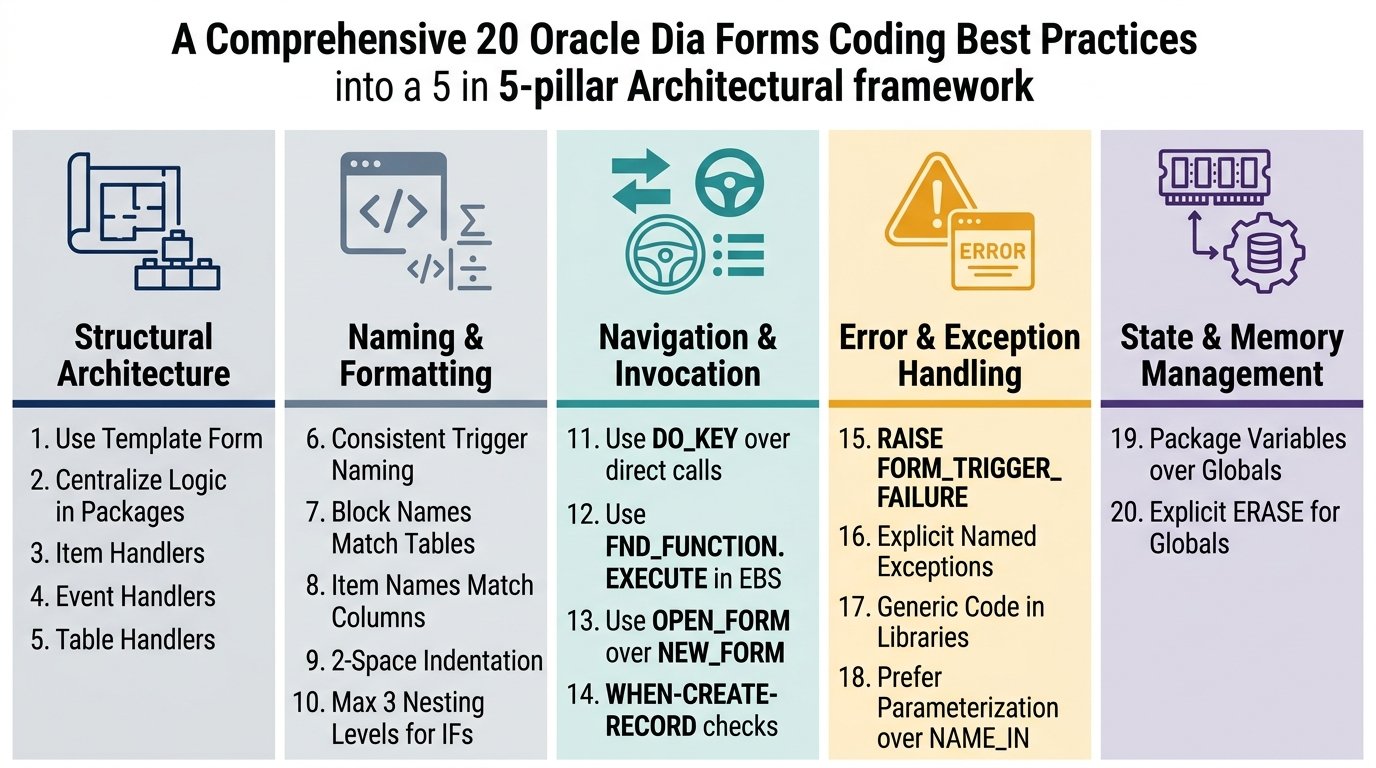
1. Use the Template Form for Every New Development
Oracle’s own standards are unambiguous: all new Forms development should begin by copying the TEMPLATE form, which includes references to standard libraries, required triggers, and property classes .
Why it matters: The TEMPLATE form (and its Oracle E-Business Suite counterpart, APPSTAND) provides a foundation that enforces consistency from the first moment. It includes object groups for toolbars, calendars, and find windows. It attaches the standard libraries that provide core functionality. Starting from a blank form means you will manually recreate all of this—or worse, forget to include it .
The pattern: Copy TEMPLATE.fmb, rename it (including the internal module name and the FND_STANDARD.FORM_INFO call in PRE-FORM), and begin your development .
The anti-pattern: Opening Forms Builder, clicking “New Form,” and building from scratch. Every form built this way will be slightly different from every other form in the application.
2. Centralize Logic in PL/SQL Packages, Not Triggers
This is the single most impactful standard on this list. Oracle’s guidance is explicit: most code should reside in procedures within packages, and trigger code should be minimal .
Why it matters: A trigger with 50 lines of validation logic is invisible until you open that specific item in that specific block. A package procedure with 50 lines of validation logic is visible in the form’s Program Units section, searchable, and reusable. When the validation rule changes, you update one procedure—not fifteen triggers scattered across the form .
The pattern: Create a package for each block. Name it after the block (e.g., EMP package for the EMP block). Add procedures for each item handler, event handler, and table handler. Call these procedures from thin triggers .
The anti-pattern:
plsql
— BAD: Everything in the trigger
WHEN-VALIDATE-ITEM
BEGIN
IF :EMP.SALARY < 0 THEN
MESSAGE(‘Salary cannot be negative.’);
RAISE FORM_TRIGGER_FAILURE;
END IF;
IF :EMP.SALARY > 50000 THEN
MESSAGE(‘Salary exceeds maximum.’);
RAISE FORM_TRIGGER_FAILURE;
END IF;
— … 40 more lines
END;
The good pattern:
plsql
— GOOD: Trigger calls a handler
WHEN-VALIDATE-ITEM
BEGIN
EMP.VALIDATE_SALARY;
END;
— In the EMP package
PROCEDURE VALIDATE_SALARY IS
BEGIN
IF NAME_IN(‘EMP.SALARY’) < 0 THEN
MESSAGE(‘Salary cannot be negative.’);
RAISE FORM_TRIGGER_FAILURE;
END IF;
IF NAME_IN(‘EMP.SALARY’) > 50000 THEN
MESSAGE(‘Salary exceeds maximum.’);
RAISE FORM_TRIGGER_FAILURE;
END IF;
END VALIDATE_SALARY;
3. Use Item Handlers for Item-Specific Logic
An item handler is a procedure that contains all the logic for validating a particular item . Oracle’s standards recommend naming these procedures after the item they handle.
Why it matters: When you need to understand how EMP.SALARY is validated, you look in the EMP package for a procedure named VALIDATE_SALARY or SALARY. You do not hunt through triggers. When the validation changes, you update one procedure .
The pattern: For an item named SALARY, create PROCEDURE SALARY in the block’s package. The WHEN-VALIDATE-ITEM trigger calls EMP.SALARY.
The naming convention: Oracle’s standard is to name the procedure after the item, using the same name. The trigger distinguishes which event fired .
4. Use Event Handlers for Cross-Item Logic
Not all logic belongs to a single item. Event handlers encapsulate logic that spans multiple items or responds to block-level and form-level events .
Why it matters: A POST_QUERY handler that populates five non-base-table items belongs in one place, not scattered across five item handlers. An event handler makes this logic visible and maintainable .
The pattern: Name event handlers after the trigger they replace, with underscores instead of hyphens. POST-QUERY becomes POST_QUERY. WHEN-CREATE-RECORD becomes WHEN_CREATE_RECORD .
Common event handlers include:
- PRE_QUERY — Populate query criteria
- POST_QUERY — Populate non-base-table items
- WHEN_CREATE_RECORD — Set complex defaults
- WHEN_VALIDATE_RECORD — Validate inter-item relationships
5. Use Table Handlers for Database Interaction
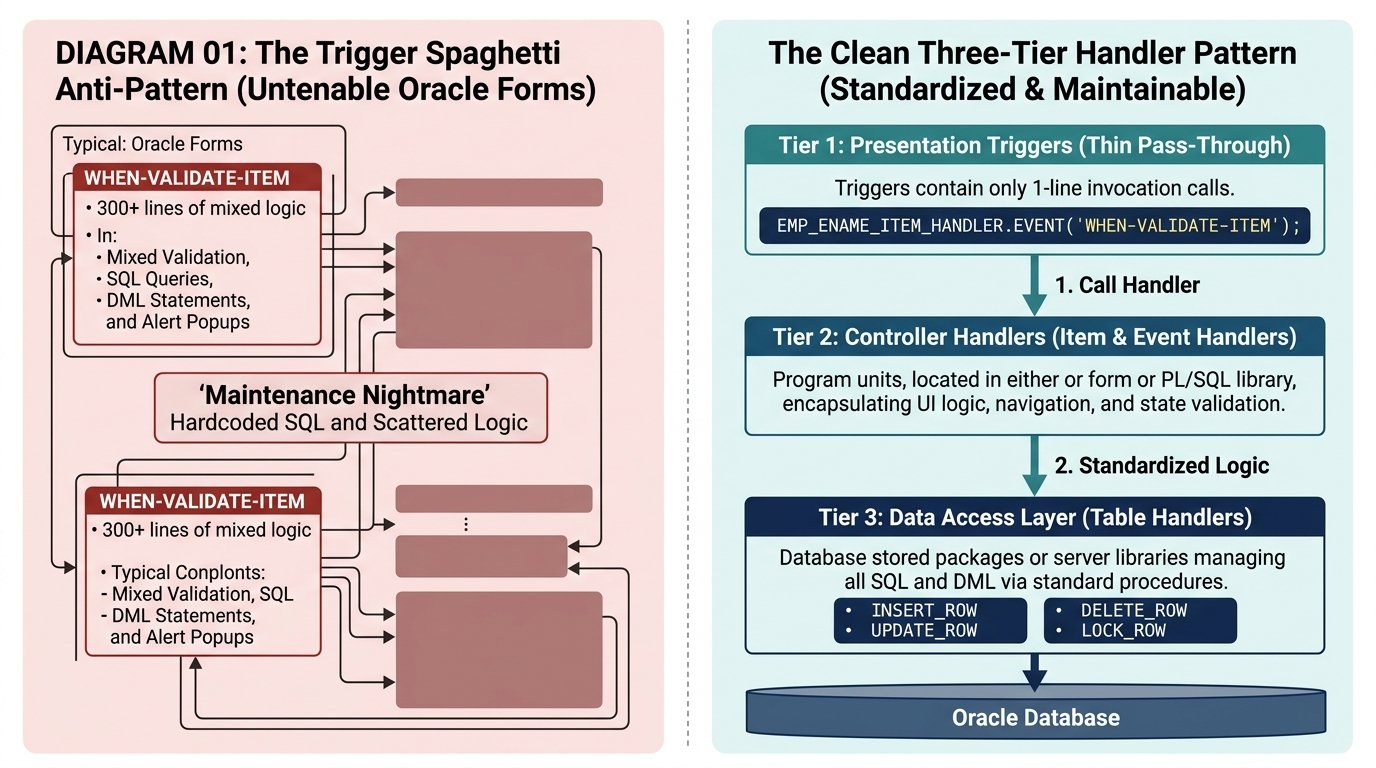
When a block is based on a view, Forms cannot automatically perform INSERT, UPDATE, DELETE, or LOCK operations. You must provide this logic yourself. Oracle’s standards call these table handlers .
Why it matters: A table handler encapsulates all database interaction for a block in one place. When the underlying table structure changes, you update the table handler—not a dozen ON-INSERT, ON-UPDATE, and ON-DELETE triggers scattered throughout the form.
The standard procedures in a table handler are:
- CHECK_UNIQUE — Verify unique constraints
- CHECK_REFERENCES — Verify referential integrity
- INSERT_ROW — Handle inserts
- UPDATE_ROW — Handle updates
- DELETE_ROW — Handle deletes
- LOCK_ROW — Handle row locking
The pattern: For a block based on the EMP table, create an EMP package with these procedures. The ON-INSERT trigger calls EMP.INSERT_ROW, the ON-LOCK trigger calls EMP.LOCK_ROW, and so on.
Naming and Readability: The Foundation of Maintainability
6. Follow Consistent Naming Conventions for Triggers
Oracle Forms has two types of triggers: standard triggers (built-in, like WHEN-BUTTON-PRESSED) and user-defined triggers (created by you). The naming convention distinguishes them .
The rule: Standard triggers use hyphens. User-defined triggers use underscores or no separator. This is a visual clue about what you are looking at .
Why it matters: When you see SHOW_HELP_CONTENTS, you know it is user-defined and must be called explicitly. When you see WHEN-BUTTON-PRESSED, you know it fires automatically.
The anti-pattern: Creating a user-defined trigger named WHEN-SHOW-HELP. The hyphens suggest it is a standard trigger, which causes confusion.
7. Name Blocks After Their Data Source
Oracle’s guidance is straightforward: block names should be the name of the table or view that is the main source of data .
Why it matters: A block named BLK1 tells you nothing. A block named EMPLOYEES tells you exactly what data it contains. When you are debugging a form with fifteen blocks, this matters enormously .
The pattern: If your block is based on the EMPLOYEES table, name it EMPLOYEES. If it is a control block containing buttons, name it by function: TOOLBAR, CONTROL, etc. .
The anti-pattern: BLOCK1, DATA_BLOCK, MAIN_BLOCK. These names provide no semantic information.
8. Name Items After Their Database Columns
The same principle applies to items. Item names should match the database columns they represent .
Why it matters: When you see :EMPLOYEES.SALARY, you know immediately which column this data comes from. When you see :EMPLOYEES.FIELD_17, you have to look up the item’s property sheet to understand what it contains .
The exception: Control items (buttons, display items, non-database items) should be named by function: BTN_SAVE, DSP_TOTAL, CHK_ACTIVE.
9. Use Consistent PL/SQL Formatting
Oracle’s standards include specific formatting guidelines for PL/SQL code :
- Indent by two spaces. Not four, not a tab. Two spaces makes nested logic visible without excessive horizontal scrolling.
- Indent SQL statements consistently. The SELECT, FROM, and WHERE clauses should be aligned for readability.
- Use uppercase for reserved words, lowercase for identifiers. PL/SQL is case-insensitive, but consistent casing improves readability .
- End procedures with the procedure name. END CHECK_SALARY; not just END;. This makes it easier to identify which procedure is ending in a long package .
The anti-pattern: Inconsistent indentation, mixed case, and bare END; statements. This code is technically correct but professionally sloppy.
10. Avoid Deeply Nested IF-THEN-ELSE
Oracle’s standards explicitly call this out: use IF-THEN-ELSIF instead of nested IF-THEN-ELSE .
Why it matters: Deeply nested IF blocks are hard to read and hard to debug. A 5-level nesting is a maintenance nightmare.
The anti-pattern:
plsql
IF condition1 THEN
IF condition2 THEN
IF condition3 THEN
IF condition4 THEN
— Logic here
END IF;
END IF;
END IF;
END IF;
The good pattern:
plsql
IF condition1 THEN
— Logic
ELSIF condition2 THEN
— Logic
ELSIF condition3 THEN
— Logic
ELSIF condition4 THEN
— Logic
END IF;
Built-in Usage: The Professional Approach
11. Use DO_KEY Instead of Direct Built-in Calls
Oracle’s standards are emphatic about this: routinely use DO_KEY instead of calling built-ins directly .
Why it matters: When you call COMMIT_FORM directly, you bypass any logic in the KEY-COMMIT trigger. When you call DO_KEY(‘COMMIT_FORM’), the trigger fires normally, and any custom logic you have added runs .
The pattern: Replace COMMIT_FORM with DO_KEY(‘COMMIT_FORM’). Replace EXIT_FORM with DO_KEY(‘EXIT_FORM’). Replace CLEAR_FORM with DO_KEY(‘CLEAR_FORM’) .
The exception: If you specifically need to avoid the trigger logic (rare), call the built-in directly.
12. Avoid CALL_FORM in E-Business Suite (Use FND_FUNCTION.EXECUTE)
If you are developing for Oracle E-Business Suite, CALL_FORM is incompatible with the standard navigation routines. Oracle’s standards require using FND_FUNCTION.EXECUTE instead .
Why it matters: FND_FUNCTION.EXECUTE respects EBS security, finds the correct form path, and integrates properly with the application’s session management. CALL_FORM bypasses all of this .
The pattern: Replace every CALL_FORM and OPEN_FORM call with FND_FUNCTION.EXECUTE .
13. Use OPEN_FORM Instead of NEW_FORM for Navigation
Oracle’s performance guidance includes a specific recommendation: use OPEN_FORM instead of NEW_FORM when navigating between forms .
Why it matters: NEW_FORM closes the current form before opening the new one. OPEN_FORM keeps the current form open. Closing and reopening forms involves significant overhead .
The pattern: For frequently-used forms, navigate with OPEN_FORM. The form remains in memory, and navigation back to it is instant.
14. Handle WHEN-CREATE-RECORD with Insert-Allowed Check
The WHEN-CREATE-RECORD trigger fires even when a block does not allow inserts. Oracle’s standards include a defensive check .
The pattern:
plsql
WHEN-CREATE-RECORD
BEGIN
IF GET_ITEM_PROPERTY(‘BLOCK_NAME’, INSERT_ALLOWED) = ‘FALSE’ THEN
NULL;
ELSE
— Your default-setting logic here
END IF;
END;
Why it matters: Without this check, your default-setting logic may run in query-only mode, causing unexpected behavior.
Exception Handling: Professional Error Management
15. Use RAISE FORM_TRIGGER_FAILURE, Not RAISE_APPLICATION_ERROR
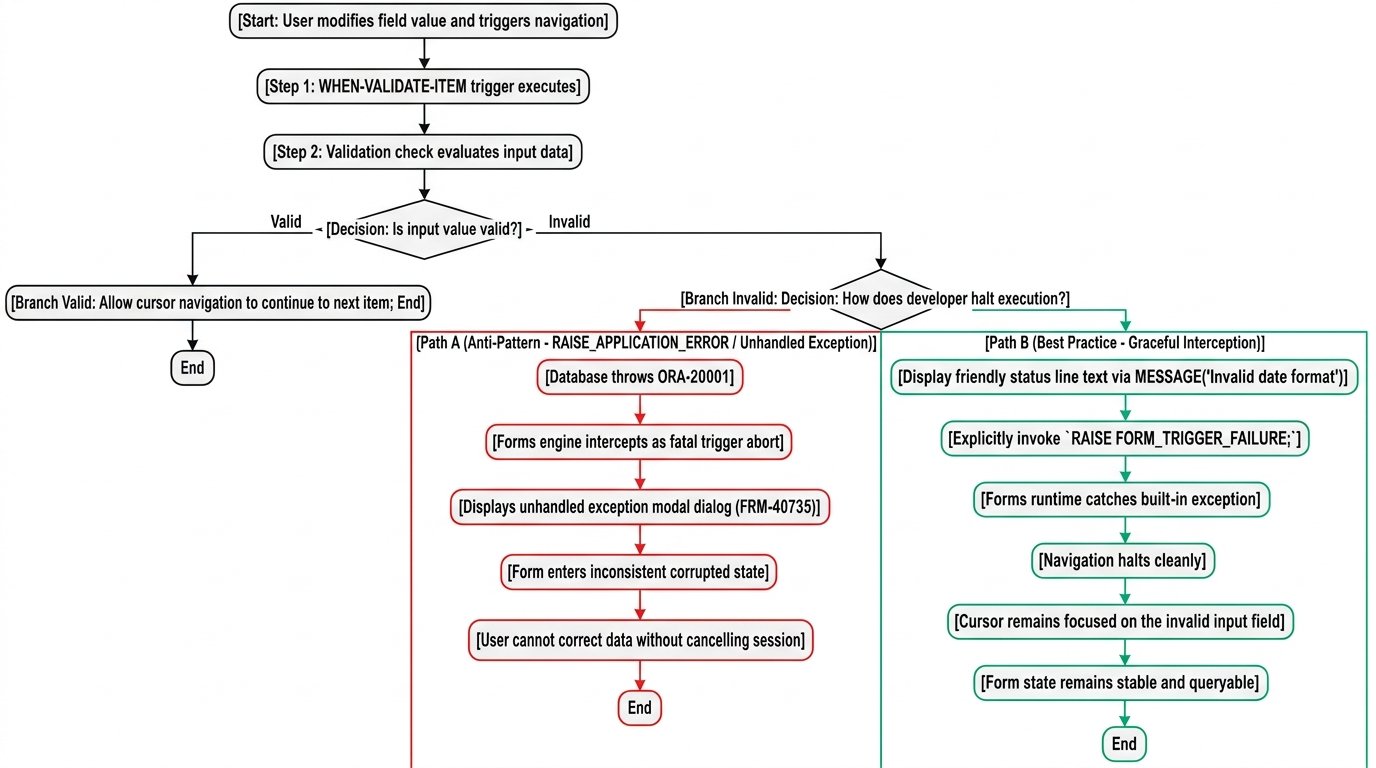
Oracle’s standards are explicit: do not use RAISE_APPLICATION_ERROR in Forms code .
Why it matters: RAISE_APPLICATION_ERROR conflicts with the exception-handling scheme used by Oracle Forms and the E-Business Suite. Use RAISE FORM_TRIGGER_FAILURE to stop processing instead .
The pattern:
plsql
IF error_condition THEN
FND_MESSAGE.SET_NAME(‘APP’, ‘MESSAGE_NAME’);
FND_MESSAGE.ERROR;
RAISE FORM_TRIGGER_FAILURE;
END IF;
Critical note: RAISE FORM_TRIGGER_FAILURE stops processing quietly—it does not display an error by itself. You must display your message before raising the exception .
16. Write Explicit Exception Handlers
Oracle’s SQL standards include a clear rule: write exception handlers for NO_DATA_FOUND instead of coding COUNT statements .
Why it matters: A SELECT COUNT(*) to check for existence is two round-trips to the database. A SELECT INTO with a NO_DATA_FOUND handler is one.
The pattern:
plsql
BEGIN
SELECT column INTO variable
FROM table
WHERE condition;
EXCEPTION
WHEN NO_DATA_FOUND THEN
— Handle the no-data case
NULL;
END;
The anti-pattern:
plsql
SELECT COUNT(*) INTO counter FROM table WHERE condition;
IF counter > 0 THEN
SELECT column INTO variable FROM table WHERE condition;
END IF;
Libraries and Reusability: Building for the Future
17. Put Generic Code in Libraries, Keep Form-Specific Code in the Form
Oracle’s guidance on PL/SQL libraries is balanced: generic code should go into libraries, and code unique to each form should stay there .
Why it matters: Putting everything into libraries creates a different maintenance problem—over-coupled code that is hard to change. The goal is reusable code, not maximally shared code .
The pattern:
- Libraries: String utilities, date calculations, common validations, UI helpers
- Form: Block-specific validation, item-specific logic, form-specific workflows
The library advantage: Code in libraries cannot reference form objects directly. This forces parameterization, which makes the code inherently more reusable .
18. Prefer Parameterization Over NAME_IN/COPY Indirection
When writing library code, you have two choices for accessing form values: indirection (NAME_IN, COPY) or parameterization (passing values as arguments). Oracle’s guidance is clear: use parameters whenever possible .
Why it matters: NAME_IN(‘EMP.SALARY’) contains a hardcoded reference. It can only work in forms that have an item named EMP.SALARY. A procedure that accepts p_salary NUMBER works in any form .
Performance bonus: Parameterized procedures are faster at runtime because there is no indirect lookup .
The pattern:
plsql
— GOOD: Parameterized
PROCEDURE CHECK_RANGE(p_value IN NUMBER, p_min IN NUMBER, p_max IN NUMBER);
— ACCEPTABLE: Indirection when necessary
PROCEDURE CHECK_ITEM_RANGE(p_item_name IN VARCHAR2);
19. Use Package Variables Instead of Global Variables
Oracle’s performance guidance includes a specific recommendation: use package variables instead of Forms global variables .
Why it matters: Global variables consume 255 bytes each and have sizing and datatype translation issues. Package variables can be typed, are scoped to the package, and can be shared across forms through a library .
The pattern: Create a GLOBAL_DATA package in a shared library with typed package variables for cross-form data.
The exception: Global variables are sometimes necessary for passing data to Reports or for inter-form communication in older architectures.
20. Erase Global Variables When No Longer Needed
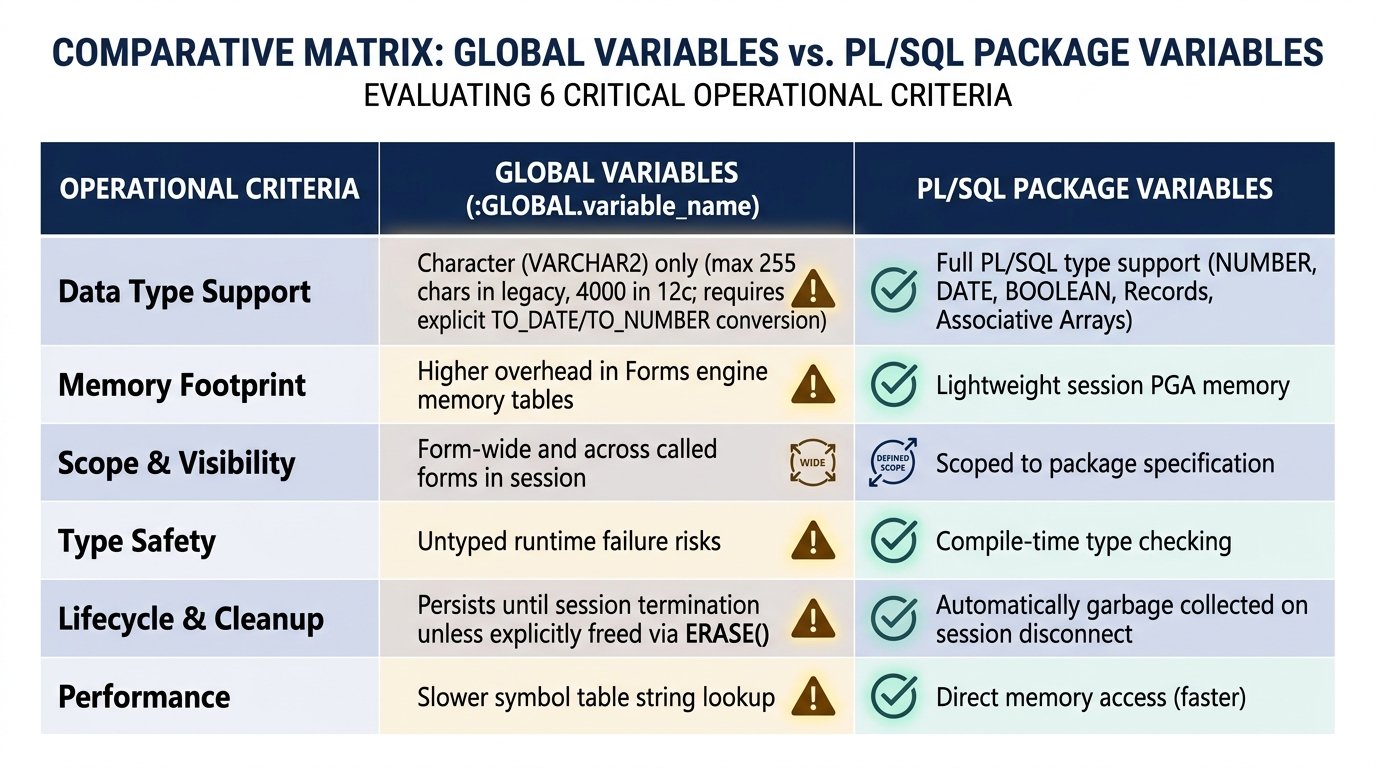
If you must use Forms global variables, Oracle’s performance standards include this rule: erase globals when they are no longer required .
Why it matters: Each global consumes 255 bytes. An application that creates dozens of globals and never erases them has a memory leak that compounds over the user’s session.
The pattern:
plsql
— When done with a global
ERASE(‘GLOBAL.TEMP_DATA’);
Quick Reference: The 20 Standards at a Glance
| # | Standard | Key Benefit | |
|---|---|---|---|
| 1 | Start from TEMPLATE form | Consistency from day one | |
| 2 | Centralize logic in packages | Maintainability | reusability |
| 3 | Use item handlers | Locate validation logic easily | |
| 4 | Use event handlers | Centralize cross-item logic | |
| 5 | Use table handlers | Isolate database interaction | |
| 6 | Hyphens for standard triggers | underscores for user-defined | Visual clarity |
| 7 | Name blocks after data source | Self-documenting code | |
| 8 | Name items after columns | Self-documenting code | |
| 9 | Consistent PL/SQL formatting | Readability | |
| 10 | Avoid nested IF-ELSE | Readability | |
| 11 | Use DO_KEY | Preserves trigger logic | |
| 12 | FND_FUNCTION.EXECUTE in EBS | Security | path resolution |
| 13 | OPEN_FORM over NEW_FORM | Performance | |
| 14 | WHEN-CREATE-RECORD insert check | Prevents unexpected behavior | |
| 15 | RAISE FORM_TRIGGER_FAILURE | Proper exception handling | |
| 16 | Explicit NO_DATA_FOUND handlers | Performance | clarity |
| 17 | Libraries for generic | forms for specific | Balanced reusability |
| 18 | Parameterize over NAME_IN/COPY | Reusability | performance |
| 19 | Package variables over globals | Memory | type safety |
| 20 | Erase globals when done | Prevent memory leaks |
The Cultural Challenge: Standards Are Worthless Without Enforcement
Here is the uncomfortable truth: you can write the most comprehensive coding standards document in the world, and it will mean nothing if the team does not follow it.
Oracle’s own standards were enforced through a combination of template forms, shared libraries, and code review. The TEMPLATE form makes it easier to follow the standards than to deviate from them. The shared libraries provide the functionality, so there is no incentive to reinvent it .
Practical enforcement mechanisms:
Code reviews. Every form gets reviewed by another developer before it is promoted. The review checklist includes the standards in this article.
Templates. Make the TEMPLATE form the only starting point. Remove the temptation to start from scratch.
Libraries. Provide the utility functions so developers do not write their own. The path of least resistance should be the compliant path.
Automated checks. Where possible, use scripting to detect violations (e.g., missing exception handlers, overly long triggers).
Lead by example. If the senior developers violate the standards, no one will follow them. If the senior developers consistently write clean code, the rest of the team will emulate them.
Conclusion: Clean Code Is a Choice, Not an Accident
Oracle Forms applications can be as clean, maintainable, and professional as any modern codebase. The tools and standards have existed for decades . The question is whether development teams choose to use them.
The 20 standards in this article represent the consensus of Oracle’s official guidance and the collective experience of the Forms development community. They are not theoretical. They are battle-tested practices that reduce defects, speed up maintenance, and make life easier for every developer who touches the code after you.
Adopt them. Enforce them. And the next developer who opens your forms will thank you