Replacing Oracle Reports in 2027: Top 5 Production Alternatives to Oracle Reports
For over twenty-five years, Oracle Reports (.rdf, .rex, rwserver) was the indisputable enterprise workhorse for formatted database documents. Millions of invoices, financial ledgers, tax certificates, picking slips, and barcode labels are still generated daily by Oracle Reports engines embedded in Oracle Forms estates and E-Business Suite instances worldwide.
However, the technology has reached its terminal lifecycle:
- Oracle Fusion Middleware 12c Premier Support ended in March 2025, leaving remaining Reports 12.2 installations on Sustaining/Extended support.
- Oracle has formally announced that there will be no Oracle Reports 14c.
- The runtime engine (rwserver) is notorious for operational instability: memory leaks, orphan background processes, and catastrophic engine crashes (REP-56048, REP-51002) during high-volume batch runs.
Faced with this deprecation, enterprise IT directors and lead Oracle architects face a pivotal decision: What is the best modern replacement architecture for legacy Oracle Reports?
The market is clouded by conflicting vendor sales pitches. Some recommend costly six-figure upgrades to Oracle Analytics Publisher (BI Publisher). Others claim Oracle APEX can replace every report out of the box—overlooking that native APEX printable pages struggle with complex multi-query matrix layouts, pre-printed stationery alignment, and automated email bursting.
In this engineering guide, we provide an objective, side-by-side technical evaluation of the top 5 production architectures for replacing Oracle Reports in 2026. We examine their licensing models, pixel-fidelity capabilities, bursting performance, and provide working PL/SQL REST implementation code to help you choose the right path for your organization.
1. The 5 Modern Reporting Architectures Evaluated
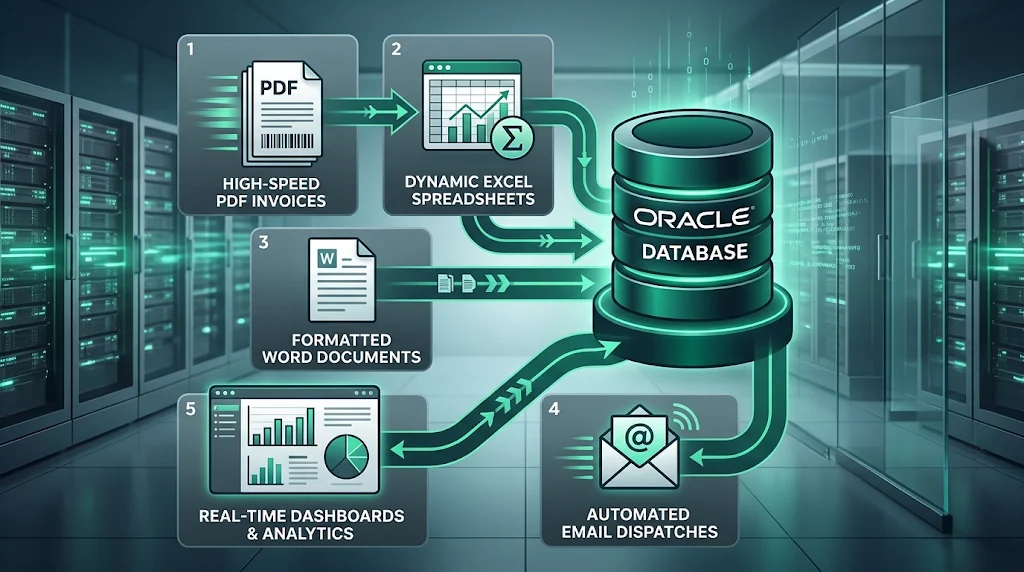
To replace Oracle Reports sustainably, your target solution must integrate cleanly with your existing Oracle Database (19c/23ai) and web tier (Oracle APEX or custom microservices).
| Evaluation Criteria | 1. APEX Office Print (AOP) | 2. Open-Source JasperReports + REST | 3. Native APEX 24.x Document Generator | 4. Headless Chrome / Puppeteer Microservice | 5. Oracle Analytics Publisher (BIP) | |||||
|---|---|---|---|---|---|---|---|---|---|---|
| Licensing Model | Commercial SaaS / On-Premise License | 100% Free / LGPL Open-Source | Included in Oracle APEX (Cloud / On-Prem) | 100% Free / MIT Open-Source | Expensive Enterprise Processor License | |||||
| Template Authoring | Microsoft Word | Excel | PowerPoint (.docx | .xlsx) | Jaspersoft Studio (Visual GUI Designer) | Office OpenXML Templates (.docx) | HTML5 | CSS3 | JavaScript | MS Word Template Builder / Web GUI |
| APEX Integration | Exceptional (Official Native Dynamic Action Plug-in) | High (Invoked via APEX_WEB_SERVICE / PL/SQL) | Native (Built directly into APEX 24.x shared components) | Moderate (Invoked via UTL_HTTP REST microservice) | Native in Oracle Cloud / Moderate on-prem | |||||
| Pixel-Perfect Alignment | High (Matches Word/Excel margins exactly) | Very High (Sub-millimeter coordinate control) | Moderate-High (Basic document styling) | Extremely High (Full CSS Paged Media @page standard) | Very High (Enterprise standard) | |||||
| Complex Matrix Reports | Handled natively via Excel/Word table tags | Built-in Crosstab Component Engine | Limited / Requires manual pre-aggregation | Handled via dynamic CSS Grid / HTML tables | Built-in Matrix / Cross-tab engine | |||||
| Batch Bursting Performance | High (Asynchronous background worker) | Very High (Multi-threaded Java daemon) | Moderate (Autonomous DB bound) | Extremely High (Node.js cluster worker pools) | High (Heavy enterprise batch scheduler) | |||||
| Infrastructure Overhead | Zero (Cloud) or Low (Single Docker container) | Low-Moderate (Single Tomcat / Java Docker container) | Zero (Runs inside Autonomous / APEX runtime) | Low (Lightweight Node.js container) | Very High (Full WebLogic Server domain required) |
2. Deep Dive: Architecture Breakdown & Recommendations
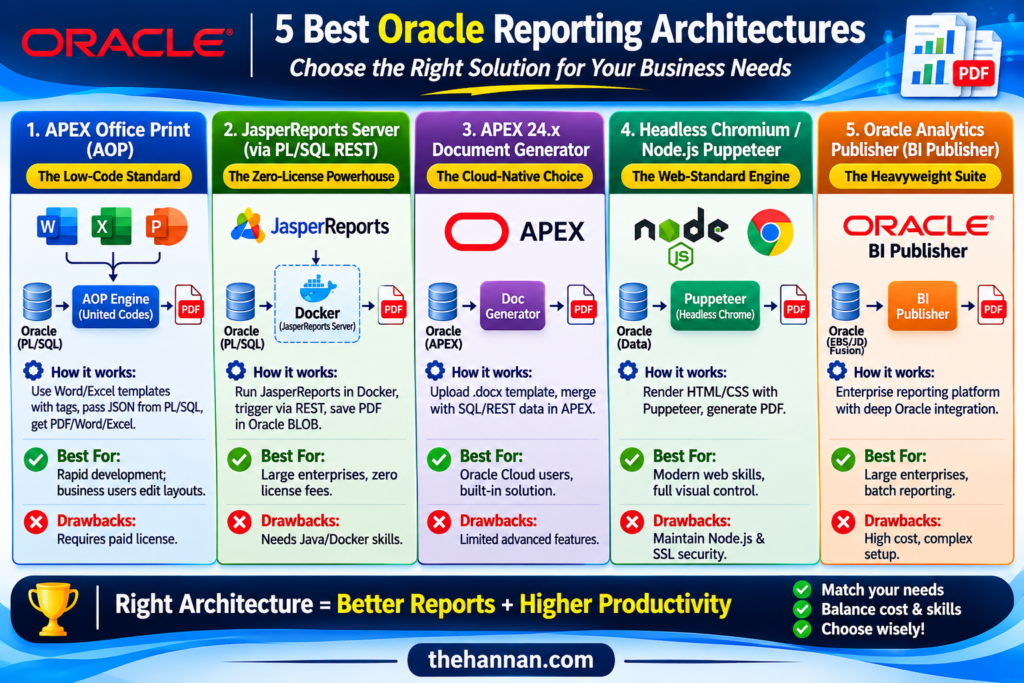
Architecture 1: APEX Office Print (AOP) — The Low-Code Standard
- How it works: AOP (by United Codes) allows developers to build report templates directly in Microsoft Word (.docx), Excel (.xlsx), or PowerPoint (.pptx) using simple template substitution tags (e.g., {order_number}, {#order_lines}{item_name}{/order_lines}). A PL/SQL plugin passes a JSON payload from Oracle to the AOP engine, which merges data into the Office template and outputs PDF, Word, or Excel documents.
- Best For: Teams that want rapid development without learning complex reporting software. Business analysts can edit report layouts in Microsoft Word without requiring developer intervention.
- Drawbacks: Requires a paid commercial license (per print volume or on-premise server license).
Architecture 2: Open-Source JasperReports Server via PL/SQL REST — The Zero-License Powerhouse
- How it works: JasperReports is an enterprise-grade Java reporting engine with a dedicated visual IDE (Jaspersoft Studio). You deploy a lightweight JasperReports Server or custom Spring Boot REST microservice inside a Docker container on your internal network. Your PL/SQL procedures trigger reports by making a lightweight REST request using APEX_WEB_SERVICE, returning generated PDF binaries directly into Oracle BLOB columns.
- Best For: Large enterprises printing millions of documents annually who want zero software licensing fees and complete independence from vendor print quotas.
- Drawbacks: Requires internal Java/Docker hosting knowledge and training developers on Jaspersoft Studio.
Architecture 3: Native APEX 24.x Document Generator — The Cloud-Native Choice
- How it works: Starting with APEX 22.2 and significantly enhanced in 24.x, Oracle introduced built-in Document Generation. You upload a .docx template as a Shared Component and merge it with a SQL or REST Data Source directly inside the APEX engine to produce PDFs.
- Best For: Organizations running on Oracle Cloud Autonomous Database (OCI) seeking a built-in solution with zero extra infrastructure.
- Drawbacks: Currently limited in advanced reporting features (such as dynamic matrix pivoting, complex conditional page breaking, and barcode printing) compared to mature engines.
Architecture 4: Headless Chromium / Node.js Puppeteer Microservice — The Web-Standard Engine
- How it works: Modern web developers build reports using standard HTML5, CSS3, and JavaScript. A lightweight Node.js microservice running Headless Chrome (via Puppeteer or Playwright) receives HTML data from Oracle, renders the page in a headless browser, and generates PDF streams via the CSS @media print standard.
- Best For: Agile teams with strong front-end JavaScript skills who want complete visual control over layouts, charts, and modern responsive reporting without proprietary report designers.
- Drawbacks: Requires maintaining a Node.js Docker container and configuring SSL/security between Oracle and the microservice.
Architecture 5: Oracle Analytics Publisher (BI Publisher) — The Heavyweight Suite
- How it works: Oracle’s flagship enterprise reporting platform. It integrates natively with Oracle E-Business Suite (EBS), JD Edwards, and Fusion Cloud.
- Best For: Large Fortune 500 enterprises with existing Oracle processor licenses that need high-volume scheduled batch jobs across multiple corporate ERP modules.
- Drawbacks: Prohibitive licensing costs for mid-market organizations, complex WebLogic clustering, and heavy memory footprint.
3. Practical Implementation: Building the Zero-License PL/SQL REST Reporting Pipeline
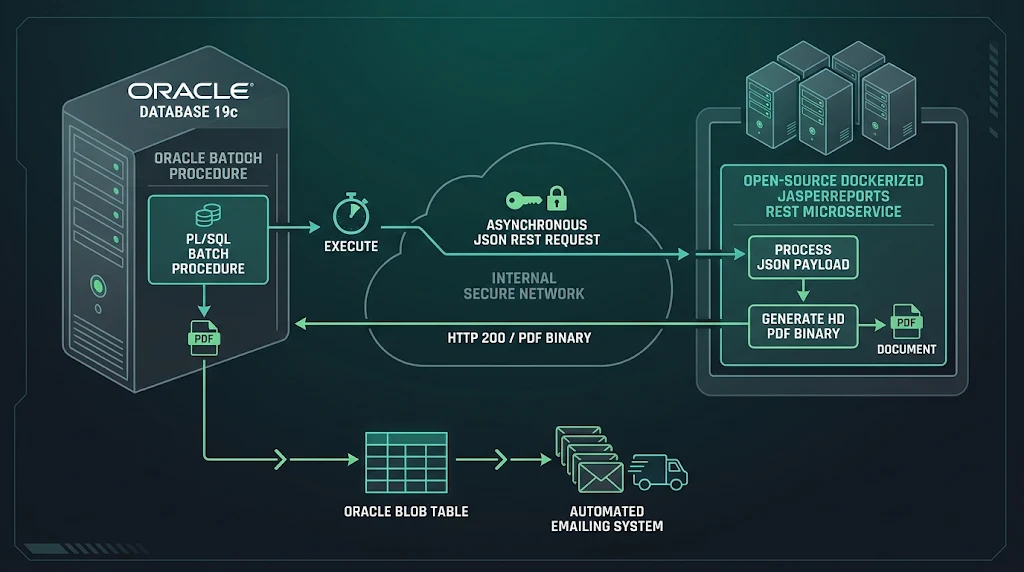
To demonstrate how seamless a modern reporting architecture can be, we will implement Architecture 2: Open-Source REST Reporting.
In this pattern:
- Oracle Database compiles report data into a clean JSON payload.
- PL/SQL calls an internal Dockerized reporting microservice using APEX_WEB_SERVICE.MAKE_REST_REQUEST_B.
- The generated PDF binary streams directly back into an Oracle BLOB column, ready for immediate browser download or automated batch email dispatch.
Step 1: The Resilient PL/SQL Reporting Package
CREATE OR REPLACE PACKAGE pkg_modern_reporting AS
    /*
    ============================================================================
    Package: pkg_modern_reporting
    Purpose: Enterprise REST Document Generator (Oracle Reports Replacement)
    Target:  Oracle Database 19c / 23ai & Oracle APEX
    ============================================================================
    */

    /**
     * Generates a PDF invoice using an external REST reporting microservice
     * and returns the binary directly into an Oracle BLOB.
     */
    FUNCTION generate_pdf_invoice(
        p_order_id IN NUMBER
    ) RETURN BLOB;

    /**
     * High-volume batch bursting: Generates and emails invoices in parallel.
     */
    PROCEDURE burst_monthly_invoices(
        p_billing_period IN VARCHAR2
    );

END pkg_modern_reporting;
/

CREATE OR REPLACE PACKAGE BODY pkg_modern_reporting AS

    -- Internal reporting microservice URL (Docker container on internal network)
    c_report_service_url CONSTANT VARCHAR2(255) := 'http://reporting-daemon.internal.corp:8080/api/v1/generate';

    FUNCTION generate_pdf_invoice(
        p_order_id IN NUMBER
    ) RETURN BLOB IS
        l_json_payload   CLOB;
        l_pdf_blob       BLOB;
        l_http_status    PLS_INTEGER;
    BEGIN
        -- 1. Construct JSON Data Payload using native Oracle JSON functions
        SELECT JSON_OBJECT(
                   'template'   VALUE 'invoice_standard.jrxml',
                   'outputType' VALUE 'PDF',
                   'parameters' VALUE JSON_OBJECT('P_ORDER_ID' VALUE p_order_id),
                   'data'       VALUE JSON_OBJECT(
                       'orderNumber'   VALUE o.order_number,
                       'orderDate'     VALUE TO_CHAR(o.order_date, 'YYYY-MM-DD'),
                       'customerName'  VALUE c.customer_name,
                       'billingAddress'VALUE c.billing_address,
                       'totalAmount'   VALUE o.total_amount,
                       'lineItems'     VALUE (
                           SELECT JSON_ARRAYAGG(
                               JSON_OBJECT(
                                   'lineId'    VALUE l.line_id,
                                   'itemName'  VALUE l.item_name,
                                   'quantity'  VALUE l.quantity,
                                   'unitPrice' VALUE l.unit_price,
                                   'lineTotal' VALUE l.line_total
                               )
                           )
                           FROM order_lines l
                          WHERE l.order_id = o.order_id
                       )
                   )
               )
          INTO l_json_payload
          FROM enterprise_orders o
          JOIN customers c ON c.customer_id = o.customer_id
         WHERE o.order_id = p_order_id;

        -- 2. Configure HTTP Headers
        apex_web_service.g_request_headers.DELETE;
        apex_web_service.set_request_headers(
            p_name_01  => 'Content-Type',
            p_value_01 => 'application/json',
            p_name_02  => 'Accept',
            p_value_02 => 'application/pdf'
        );

        -- 3. Invoke REST Reporting Service (Binary Return)
        l_pdf_blob := apex_web_service.make_rest_request_b(
            p_url         => c_report_service_url,
            p_http_method => 'POST',
            p_body        => l_json_payload
        );

        l_http_status := apex_web_service.g_status_code;

        IF l_http_status != 200 THEN
            raise_application_error(
                -20010,
                'Reporting Service Failure: HTTP Status ' || l_http_status ||
                ' received from reporting microservice.'
            );
        END IF;

        RETURN l_pdf_blob;

    EXCEPTION
        WHEN OTHERS THEN
            -- In production, log error to your application error logging table
            RAISE;
    END generate_pdf_invoice;

    PROCEDURE burst_monthly_invoices(
        p_billing_period IN VARCHAR2
    ) IS
        l_pdf_doc  BLOB;
    BEGIN
        FOR r_inv IN (
            SELECT order_id, customer_email, order_number
              FROM enterprise_orders
             WHERE billing_period = p_billing_period
               AND status = 'PENDING_DISPATCH'
        ) LOOP
            -- Generate PDF binary
            l_pdf_doc := generate_pdf_invoice(r_inv.order_id);

            -- Dispatch directly via APEX_MAIL
            apex_mail.send(
                p_to        => r_inv.customer_email,
                p_from      => 'billing@enterprise.corp',
                p_subj      => 'Monthly Invoice: ' || r_inv.order_number,
                p_body      => 'Dear Customer, please find attached your monthly invoice.',
                p_body_html => '<p>Dear Customer,<br>Please find attached your monthly invoice.</p>'
            );

            -- Attach generated PDF binary
            apex_mail.add_attachment(
                p_mail_id    => apex_mail.get_last_message_id,
                p_attachment => l_pdf_doc,
                p_filename   => 'Invoice_' || r_inv.order_number || '.pdf',
                p_mime_type  => 'application/pdf'
            );

            UPDATE enterprise_orders
               SET status = 'DISPATCHED'
             WHERE order_id = r_inv.order_id;
        END LOOP;

        -- Push pending mail queue
        apex_mail.push_queue;
    END burst_monthly_invoices;

END pkg_modern_reporting;
/
4. RDF Modernization: Refactoring Multi-Query Data Models into Modern SQL
A primary stumbling block when migrating Oracle RDF reports is the legacy Reports Data Model.
In Oracle Reports Builder, developers frequently built spaghetti data models: multiple independent SQL queries (Q_1, Q_2, Q_3) chained together via graphical Data Links, with client-side Formula Columns (CF_) and Summary Columns (CS_) executing PL/SQL calculations on every row iteration.
Attempting to run these multiple queries sequentially in modern web reports results in the classic N+1 query performance anti-pattern.
Legacy RDF Data Model Example:
- Q_CUSTOMER: SELECT customer_id, customer_name FROM customers
- Q_ORDERS: SELECT order_id, order_total FROM orders WHERE customer_id = :customer_id (Chained via Data Link)
- CF_COMMISSION: PL/SQL Formula: IF order_total > 1000 THEN RETURN order_total * 0.05; ELSE RETURN 0; END IF;
- CS_CUST_TOTAL: Summary Column: SUM(order_total) RESET AT customer_id
Modern SQL Refactoring with Analytical Window Functions:
Instead of multiple queries and procedural formula loops, modern database engineering collapses the entire hierarchy into a single, set-based, high-performance SQL query using Analytic Functions and Common Table Expressions (CTEs):
WITH customer_orders AS (
    SELECT c.customer_id,
           c.customer_name,
           o.order_id,
           o.order_date,
           o.order_total,
           -- Replaces CF_COMMISSION Formula Column
           CASE
               WHEN o.order_total > 1000 THEN ROUND(o.order_total * 0.05, 2)
               ELSE 0
           END AS commission_amount,
           -- Replaces CS_CUST_TOTAL Summary Column (Group Break Subtotal)
           SUM(o.order_total) OVER (
               PARTITION BY c.customer_id
           ) AS customer_grand_total,
           -- Running total across customer orders
           SUM(o.order_total) OVER (
               PARTITION BY c.customer_id
               ORDER BY o.order_date, o.order_id
               ROWS BETWEEN UNBOUNDED PRECEDING AND CURRENT ROW
           ) AS customer_running_balance,
           -- Calculate row numbering for clean master-detail display
           ROW_NUMBER() OVER (
               PARTITION BY c.customer_id
               ORDER BY o.order_date DESC
           ) AS order_sequence_num
      FROM customers c
      JOIN orders o ON o.customer_id = c.customer_id
     WHERE c.region_id = :P20_REGION_ID
)
SELECT *
  FROM customer_orders
 ORDER BY customer_name, order_date DESC;
Why This Modern Approach Wins:
- Single Database Round-Trip: The database processes the entire dataset in a single execution plan, utilizing optimal hash joins and memory-based windowing.
- Zero Procedural Context Switching: Eliminates thousands of individual PL/SQL formula column context switches between the SQL engine and PL/SQL compiler.
- Universally Compatible: The output can be fed directly to APEX Interactive Reports, JasperReports, AOP, or a JSON REST payload without modification.
5. Architectural Decision Tree: Which Solution Fits Your Organization?
Use this decision logic to determine your organization’s optimal migration path:
[Start: Replacing Oracle Reports]
  │
  ├── Do you have existing, paid Oracle BI Publisher / Analytics licenses?
  │     ├── YES ──> Migrate to Oracle Analytics Publisher (BIP)
  │     └── NO
  │          │
  ├── Is your application running 100% on Oracle Cloud Autonomous Database?
  │     ├── YES ──> Native APEX 24.x Document Generator
  │     └── NO
  │          │
  ├── Do you have strict budget constraints ($0 licensing required)?
  │     ├── YES ──> Open-Source JasperReports + PL/SQL REST Microservice
  │     └── NO
  │          │
  ├── Do business analysts demand template editing in MS Word/Excel?
  │     ├── YES ──> APEX Office Print (AOP)
  │     └── NO  ──> Headless Chromium / Puppeteer HTML5 Microservice
6. Summary Migration Roadmap for Reports Estates
- Inventory & Categorization: Catalog all .rdf files. Categorize into:
- * *Simple tabular dumps* (Migrate directly to APEX Interactive Reports / Grids).
- * *Complex pixel-perfect documents* (Invoices, checks, barcodes -> Target for AOP or JasperReports).
- * *Obsolete / un-run reports* (Typically 30–40% of legacy reports have not been executed in over 2 years).
- Refactor Data Models: Convert multi-query data models into set-based SQL using Window Functions (PARTITION BY).
- Decommission rwserver: Shut down WebLogic Reports Server domains to reclaim significant server RAM and eliminate frequent REP-56048 crash headaches.
7. Frequently Asked Questions (FAQs)
Q1: Can Oracle APEX Interactive Reports completely replace Oracle Reports?
For interactive data analysis, screen viewing, and simple CSV/XLSX downloads, yes. However, an Interactive Report cannot replace pixel-perfect, fixed-coordinate printing (such as pre-printed payroll checks, dual-sided invoices with terms on reverse, or multi-label Zebra barcode sheets). For those use cases, pair APEX with a dedicated document engine like AOP or JasperReports.
Q2: What causes the chronic REP-56048 engine crash in Oracle Reports 12c?
REP-56048: Engine rwEng-0 crashed is typically caused by unmanaged JVM heap exhaustion inside the in-process Reports Server engine, or font mapping failures on headless Linux servers where the X11 DISPLAY or uifont.ali settings are misconfigured. Read our dedicated guide on 20 Common Oracle Reports Errors and Fixes for deep troubleshooting steps.
Q3: How do we handle barcode printing in the new architectures?
All modern alternatives handle barcodes far better than legacy Oracle Reports. AOP and JasperReports include native barcode libraries (Code 128, QR Code, DataMatrix, PDF417). For thermal warehouse printers, you can bypass document rendering entirely by generating raw Zebra Programming Language (ZPL) strings directly in PL/SQL and streaming them over TCP sockets via UTL_TCP.
Related Engineering Resources
- Troubleshooting Oracle Reports Errors: Read our exhaustive diagnostic guide on 20 Most Common Oracle Reports Errors (REP-xxxx) and Their Fixes. 20 Most Common Oracle Reports Common Errors (REP xxxx) and Their Fixes | thehannan.com
- Database Maintenance Scripts: Download production health check and session scripts from our Code Scripts Library. Code Scripts Library | thehannan.com
- Plan Your Modernization: Need enterprise architectural guidance to replace your Oracle Reports infrastructure? Book a Strategy Consultation here-> Book Appointment | thehannan.com